
Many of you are patiently waiting for me to finalise the creation of the new A.I Noise Reduction presets for Canon’s professional mirrorless cameras. The good news is I have now finished all of the colour checker analysis over the last week, and I have also finalised and optimised A.I Noise Reduction settings for every single ISO for the Canon EOS R1. This was a painful, painstaking process of analysis that involved many days of staring at my computer screens. Whilst it may seem a simple process to tweak the single A.I noise reduction slider for each different ISO, the reality of getting it optimal is anything but. Different colours respond differently at different ISO settings, and optimising the amount slider is an agonising back-and-forth process that has taken much more time than I anticipated.
Today, I was planning to finish the last step and create the A.I NR preset and post my results, and the preset for sale. However, I have run into a significant problem. Adobe has not enabled the ‘Support Amount Slider’ for A.I Denoise, which means, in practice, the application of the preset does not set the amount slider for A.I noise reduction! You can see the screenshot below, the tick box is greyed out.
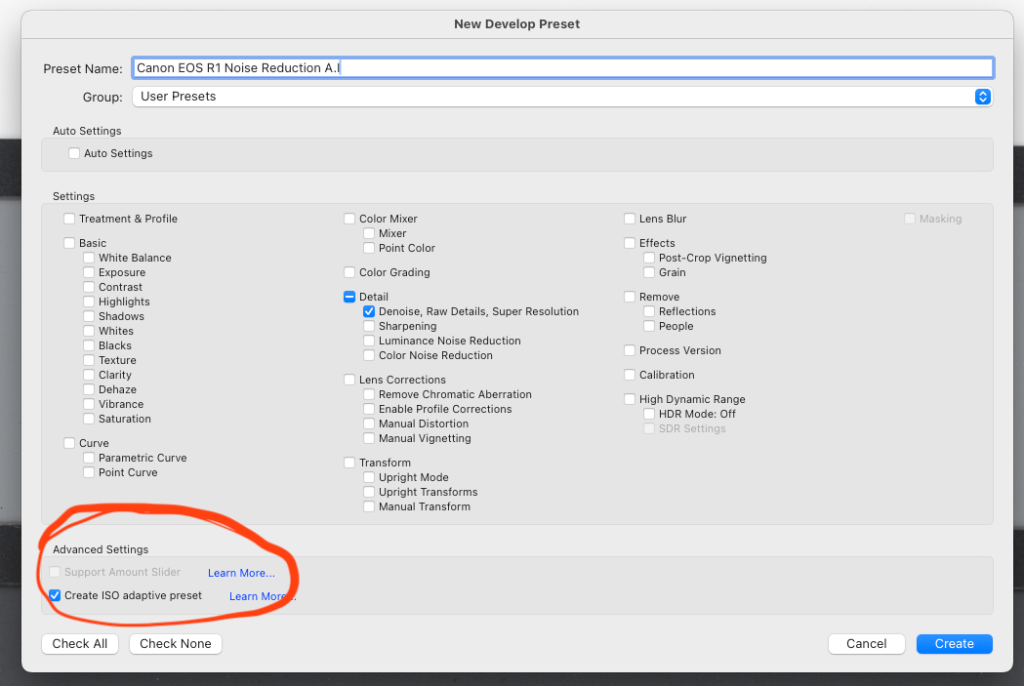
What this means in practice is that the preset will apply A.I Noise Reduction, but will set the slider amount to its default setting only. This effectively makes an A.I NR preset useless as you would have to manually adjust the slider (which defeats the entire purpose of a preset). I am unsure why Adobe has not supported the amount slider, but I have an email in with Adobe on this issue at present. More to come once I hear from Adobe.
 www.WILDNATUREPHOTOTRAVEL.com