
Keyboard shortcuts are a fantastic way to save time and speed up your workflow when processing images in Adobe Lightroom. Lightroom has a great many keyboard shortcuts (in fact, too many to remember off hand) and some time ago I posted a link to download a really handy cheat sheet. The cheat sheet has now been updated for the latest Lightroom Creative Cloud Classic; which can be downloaded here: Download the Full Resolution Cheat Sheet. There is also a shortcut sheet for Photoshop. Thanks to Natasha for all the hard work in putting this together.
Category: Equipment
Photographic Equipment
The Toughest Print…
As many of my regular readers, friends and fellow photographers know, I love to print. For me, the photographic print is not only the final end result of the photographic process, but is importantly the ultimate expression of my work. The online jpeg is nothing more than a poor facsimile of the finished fine art print; where as the finished print is the medium in which I prefer to have my photography viewed. I really wish I could more easily share my printed photographs with a broader audience(Facebook needs a print sharing service!) and whilst it is possible to visit one of the galleries that represent my photography it is not always convenient or possible; especially for those that are not local.
I have in the past written about my need to print and spoken to the fact that I never really feel like I have finished with a photograph until I have made a print. The journey and process is extremely satisfying to me and the print is the final finish line for each photograph. Honestly, not every image makes it over the line, but those that do give me a great deal of satisfaction.
Over the last few days I have been working on a particular print that has proven to be the most difficult of my career thus far and I want to share how I finally achieved the perfect print of this photograph. It’s not a photograph that translates well in an online jpeg (unfortunately the jpeg compression destroys the tonalities), but it is simply wonderful in its final finished printed form. The photograph was taken last winter in Svalbard during my snow mobile expedition and is a layered white-on-white arctic landscape. The landscape was bathed in a very soft ethereal light when I made this photograph and contrast was extremely low. Super dense cold air hung low in the valleys and a subtle gentle fog softened the distant mountains. The darkest part of the scene was a distant rocky ridge-line, but even it was many shades above black. As a result the scene was high-key, yet it contained no harsh whites or blown out areas. Honestly, outside of getting to this remote location and the freezing temperature (around -30º Celsius) it was not a difficult photograph to make. It has however been a complete bear to process and print. There are literally hundreds of shades of different white in the photograph with extremely delicate tonalities that require just the right amount of finesse to print. Anything less than perfect results in flat areas that lack depth. The heart of the problem is that inkjet printers are not equipped with white ink. So, the whitest white one can achieve in an inkjet print is the natural white of the paper you have chosen (and not all papers are created equal). Hence, paper choice is a critical factor in the fine art printing process. Whilst it is true that lustre and gloss papers have a better d-max (better, deeper blacks) than matt papers I vastly prefer matt papers for their art feel, surface texture and softer finish. I personally find lustre and gloss papers (even the expensive Baryta papers) take away from the evocative feelings I want to portray in my work. As a result virtually all of my printing is on matt paper – specifically Moab Somerset Museum Rag. Somerset Museum Rag is a 300 gsm fine art paper with a subtle surface texture and a wonderfully high white point (with a good solid black point for an art paper). I have been printing with Museum Rag for many years and I have a very good understanding of the capabilities and limitations of this paper. It is absolutely ideal for printing snow and ice images in my experience.
Before I describe the process by which I achieved what I feel is the perfect print of this photograph I want take a few steps backward and start at the beginning of the process. The real key to making a fine art print is to start with a great capture. Anything less than a great capture will never be a great print – period. By a great capture, I mean an image that has been well exposed with its histogram biased towards the right hand side (without clipped highlights) , sharp where it needs to be and free from excessive noise. Once you have a great capture you need to carefully process the RAW file to bring out the best in the photograph (a totally seperate skill to the capture process). In the case of this photograph I took extreme care with contrast and highlights to gently pull out all of the subtle tonalities in the highlights in the file. There would be a strong temptation amongst many to bring down the blacks in this file until the rocky ridge-line had a hard deep solid black; but thats not how the scene was in reality and such artificial contrast would look extremely unnatural. As subjects get further away from our eyes they naturally loose contrast and bleed off into the distance. Artificially adding too much contrast will add impact, but it does so at the expense of image depth so you have to tread very carefully. This is of course an artistic decision, but in my case I wanted to print the scene as I remembered it and not create something that did not exist in Nature. All up, I probably spent an hour or so processing and re-processing this file until I was happy with the end result. Only then can you consider making a fine art print of the photograph.
At this point the first thing you need (other than an actual printer) is the best profile for your printer, paper and ink that you can lay your hands on. On no account should you compromise on the quality of the profile and on no account should you even consider using a canned generic profile. You absolutely must have a custom made high quality profile that you either made yourself, or had someone (who knows intimately what they are doing) make for you. I make own own profiles with an X-Rite ISIS2 and with a friend using his Barbieri Spectrophotometer. There are key differences between these units so I use both depending on what paper I am profiling.
Assuming you have ticked all the above boxes how do you then print a photograph that is basically a thousand shades of white on a piece of white paper with a printer that doesn’t use white ink?
The answer is you have to understand what the white point of your chosen paper is and what is the brightest white you can print on that particular paper. Without this information you have little chance of actually rendering all those subtle white tonalities and shades in the print. In my case, I started by actually measuring the white point (and black point) of Somerset Museum Rag which turned out to be 90.3 with a Dmax of 3.2. I then used this information to modify my custom profile to ensue my whites would not be blown out during printing.
I then created a test chart as below that has shades of white and black from 0 (black) to 255 (pure white). I then printed this test chart with my custom modified profile for Somerset Museum Rag, allowed it to dry and then critically examined it in my Graphiclite print booth to see how much highlight and shadow gradation I was actually achieving. In my case (and with my eyes) I can see highlight detail in my test print all the way up to 253 and shadow detail all the way down 5. Anything below 5 is the same shade of black to my eyes as the 5 shade. In the highlights anything above 253 (254 and 255) appear as paper white to me. This is an exceptional result on a matt paper and is testament to the quality of the profile used to make the print. Armed with this information I now knew that anything in my file that was above 253 would render purely as paper white and anything below 5 would render as a solid black. In this photograph the blacks are actually all but irrelevant since the darkest shades in the photograph are well above this (but it is an interesting exercise to understand for prints with dark tonalities). I then soft-proofed the image in photoshop with my custom profile and the Relative Colorimetric rendering intent and used a levels adjustment to tweak the highlights. In essence I manipulated the brightest tones in the photograph to bring them down to a point where I could see tonal gradation on the paper. I then used several curve layers to increase highlight contrast in certain tones to compensate for the fact that the front lit paper has a lot less contrast than the back-lit LCD screen. Great care had to be taken with these curves to ensure I kept my highlights under the paper white level. I then made a number of test prints of the photograph making small subtle adjustments to the curve layers to better render the tonalities in the extreme highlights. This was an iterative process that took quite a few prints to get just right.
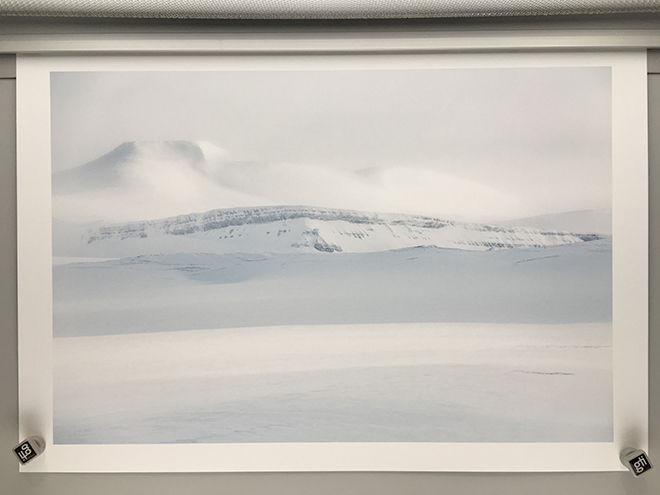 The end result is to my eyes absolutely perfect in terms of its rendition of tone in the highlights. The soft ethereal mountains are perfectly rendered with all of the mystical feeling I remember when I took the photograph. The rocky ridge-line and gentle snow slopes blend their shades of white perfectly; with the foreground having just the right amount of texture and tone. Although I would never enter this print into a competition (most judges would fail to grasp the difficulty of the print) it was one of the most rewarding I have made in recent times.
If you are not printing your work I urge you to make a start and get those 1’s and 0’s off your hard drive and onto paper where they can fully be appreciated. It is absolutely one of the greatest joys of photography.
Post-Production of Ice and Snow Photographs with MacPhun Luminar Neptune
A couple of years ago I did a short video where I demonstrated some techniques that utilised the Nik suite of plug-ins for processing photographs with ice and snow. Specifically, how you use the Tonal Contrast filter in Color-EFX Pro to ensure you had both tone and contrast in your snow and ice (without tone and texture in snow and ice all you have is a flat white scene). Google (who owns Nik) has more or less abandoned the entire Nik suite in recent times (and updates have been non-existent) so I have likewise abandoned Nik and switched over to the Luminar plugin by MacPhun. As a result of this switch I wanted to demonstrate how you can not only achieve the same effect as the Tonal Contrast filter in Nik with the Luminar suite, but actually have even more control over the results. As an added bonus the Luminar plug-in also runs a lot faster than the old Nik plug in. The short video below demonstrates how to achieve wonderful texture and tone in your snow and ice in just a few steps. Just click on the image below to watch the video.
Extraordinary Vision Magazine Features Choosing an Antarctic Expedition Part Four
Extraordinary Vision Magazine issue #58 has just published Part Four of a recent series of Articles I penned on How to Choose an Expedition to Antarctica. Part Four is all about what equipment is going to best help you capture the majesty of Antarctica. Choosing the right expedition will make or break the photographic opportunities you will experience in Antarctica. If you are planning or considering a future photographic expedition to Antarctica I recommend you take a few moments out of your day and check it out. Part One, Two and Three were published in earlier issues and are available here on my blog and through EV magazine.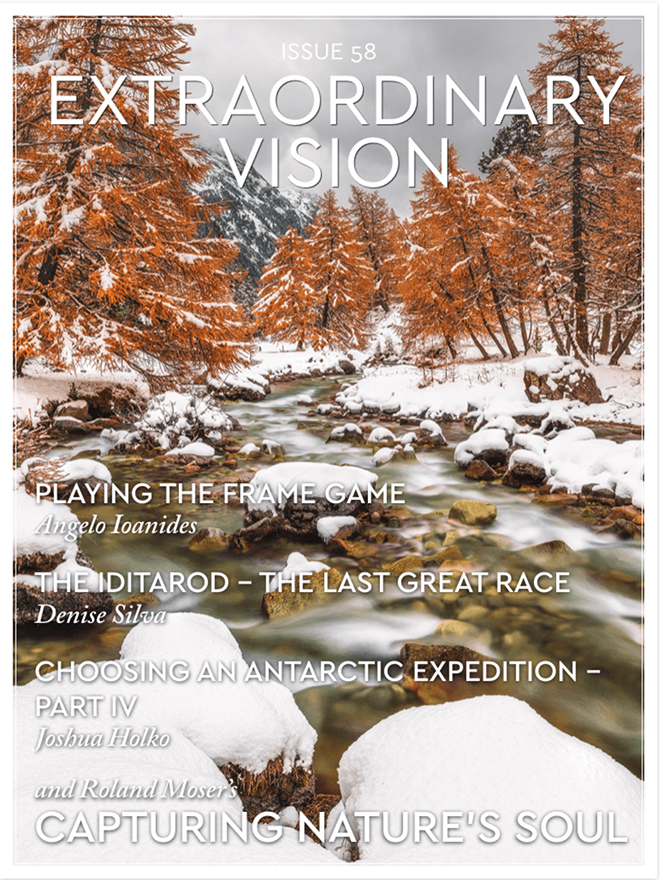 Extraordinary Vision magazine is available fortnightly with a kick start free trial. Best of all its only $1.99 to subscribe per month – less than a cup of coffee. Do yourself and your creativity a favour and check it out. Available exclusively though the iTunes App store or Google Play.
Choosing an Expedition to Antarctica – What you Must Know Addendum
The response to the recent series of articles I published on what you must know when choosing an expedition to Antarctica has been beyond fantastic – thank you. As such, I wanted to expand a little further and publish a short addendum post to Part Four of the series and add in a couple more items of equipment you should consider before your expedition (my thanks to Anil for the first two excellent recommendations). If you missed the earlier parts of the series you can read Part One, Part Two, Part Three and Part Four at each of these links. Most expedition ships will provide you with a pair of rubber boots (Wellingtons) for zodiac cruises and shore landings. However, these boots are generally not insulated and provide poor warmth and support (even if you bring inner sheep skin liners). They are also frankly pretty disgusting having been used and abused by countless participants over many years. I recommend you plan to bring your own boots and that you purchase a pair of Arctic Sport Muck Boots. These insulated waterproof boots are absolutely ideal for expeditions to Antarctica and will keep your feet both warm and dry. They are also relatively inexpensive and useful to have around the house for occasions such as washing cars once you get home. Hiking boots and similar type boots are not suitable for zodiac operations and shore landings in Antarctica. You absolutely must have a boot that comes up to just below the knee and that is warm and completely waterproof. A pair of Arctic Sport Muck Boots will last you many years and will keep you warm, dry and clean. I actually also use my Arctic Sport Muck Boots on board whenever I am photographing from the deck of the ship.
The next item is actually more of a tip than a piece of equipment. You should ensure you mark your dry bag (along with all your possessions) clearly with your full name and contact details. All equipment tends to look alike on expeditions and its best to avoid any confusion by clearly labelling all of your bags and equipment. I even go so far as labelling my card readers as these are items participants tend to borrow quite often. Items such as camera equipment can me labelled with a label maker and clothing and bags can be labelled either with a sharpie or with permanent tags. On the question or sunglasses or snow goggles for zodiac operations I tend to prefer sunglasses in all but the heaviest of blizzards. Sunglasses are easy to photograph with where as it is necessary to remove goggles to actually see through the cameras viewfinder. Personally I like and use sunglasses from Maui Jim as they have no colour tint and are heavily polarized. For goggles I like and use Zeal.
 Although I briefly touched on clothing in Part Four of this series I want to expand a little further on the outer waterproof shell you will need to wear for zodiac operations and shore landings. If possible, I recommend you purchase Goretex bibs rather than pants as these will afford your lower back much needed protection when you are bending over in the zodiac. There is nothing more uncomfortable than salt spray down ones lower back and a good pair of waterproof bibs will ensure you are protected from this unfortunate and uncomfortable eventuality.
It is a very good idea to take a number of microfibre cleaning cloths with you and to keep one handy in an outer jacket pocket at all times. Salt spray, snow, sleet and rain drops are all a fact of life in Antarctica and you will have to clean the front element of your lens regularly during most outings. A lens hood is also a very good idea for all your lenses as it affords some additional protection for the front element of the lens.
Micro-spikes and crampons are not required in Antarctica and are best left at home unless you have a very specific need for them. If you do bring spikes with you keep in mind that you will not be allowed to put them on until you go ashore. I strongly recommend you purchase and download SanDisks Rescue Pro software to recover any images from damaged or accidentally formatted CF, SD and CFAST cards. I have used this software on several occasions to recover images from cards that clients have accidentally formatted or from cards that are proving otherwise unreadable. This useful piece of software is absolutely worth investing in when you weigh the importance of your photographs against the cost of the expedition.
Underwater housings can be used in Antarctica with great success but you should check with your photographic leader before hand on what sort of opportunities you may have to use this sort of specialised equipment. Not all expeditions cater to underwater photographers and it is best to understand if you will have an opportunity to use this equipment before you schlep it all the way to Antarctica. As some of you are aware I recently invested in a Nauticam NDA-1DXMKII underwater housing for one of my Canon EOS 1DX MKII cameras and I plan to use this in Antarctica this November with a new pole-cam system. The pole-cam system has been designed to facilitate underwater photography without actually having to get into the water. I will have more details on this new custom made system soon.

 www.WILDNATUREPHOTOTRAVEL.com