This made me laugh – A polar bear protecting its privacy has run off with a photographer’s tripod as a group was taking pictures in the Arctic. I would have loved to see the Gitzo repair man’s face when the customer sent in their ‘bear damaged’ carbon fibre tripod for repair. Full Story
Category: News and Updates
JHolko Photography Latest News and Updates
Kaikoura New Zealand
Kaikoura is a gorgeous little fishing village is located about midway between Christchurch and Picton in the South Island of New Zealand. Its a wonderful location for landscape photography and offers spectacular sunrises with its north western arch cloud formations and snow capped mountains. The combination of ocean and mountains offers stunning coastal alpine scenery that is unique in my experience. This first photograph from Kaikoura was taken after sunset and although it features neither the snow capped mountains or the northwestern arch clouds in full sunrise colour it is nevertheless one of my favourites from the few days I spent there. I used 3 stop hard graduated neutral density filter to darken the sky and a slow shutter speed to blur the racing clouds and outgoing tide. The outgoing tide and the soft blurred clouds in this photograph add a sense of dynamic movement that greatly appeals to me.

Miss the Darkroom? More iPhone Goodness…
Swankolab have the darkroom of yesterday for today. From their website: “Introducing SwankoLab, a brand new darkroom kit from the makers of Hipstamatic. It’s a loving recreation of the pre-digital era classic. Choose chemicals, process photos, and experiment!”
I haven’t tried it (and probably wont) but it did make me laugh and I guess if you are feeling nostalgic and missing the old days of mixing chemicals in a dark room this could well be the application for you.
Exposures Longer than 30 Seconds – iPhone to the Rescue!
I was having coffee with a keen, but affectionately ‘green’ photographer friend the other day and we were discussing long exposures and how we both really appreciate the softness of both clouds and water that is so often introduced by long exposure photography. He asked me: ‘Since I do virtually all of my landscape photography pre-dawn and post sunset how I expose for longer than 30 seconds with my Canon 1DS MK3 camera?’ A fair question for someone new to the game since Canon digital cameras limit the maximum exposure time to 30 seconds in every mode (except Bulb). Which means without a light meter or a mathematical brain you can be in a spot of bother for working out the exposure of a given scene.
Well, I don’t carry a separate light meter, which is the obvious answer. Its not that I dont like them or know how to use one, its just that it would be yet another peice of ancillary equipment in my already over laden and overweight camera bag. As it happens, I don’t carry an exposure chart either (I am done with charts after my Scuba diving days), and since crunching numbers is not my strong point I found a more appealing solution in the form of an iPhone application called innovatively enough ‘PhotoBuddy‘. Is there no limit to the usefulness of iPhone applications?
What is PhotoBuddy and How do I use it for calculating exposure times?

PhotoBuddy is a user pays iPhone application that offers a suite of different features; one of which is an exposure calculator. Since this is not intended to be a full feature review of PhotoBuddy I am not going to delve into everything this little application offers or is capable of. Instead I am going to focus on its exposure calculator; which is at the crux of determining exposure times of longer than 30 seconds for Canon digital cameras.
By way of example, If I have arrived at my chosen photographic location pre dawn and have my camera set up on the tripod ready to shoot and my cameras meter is telling me that I need an exposure longer than 30 seconds at my chosen F-stop of F8, then all I do is open up the aperture (or increase the ISO) until I get a correct exposure reading – in this case lets say its F5 to give me a 30 second exposure in Aperture Priority. Then I just launch PhotoBuddy on the iPhone, click the exposure option, input the F-Stop that will give me a correct exposure at 30 seconds (F5 in this case). Then select the shutter speed as the value you wish to calculate and adjust the aperture accordingly to F8 or your desired aperture. PhotoBuddy automatically recalculates the new shutter speed for you – 80 seconds in this example. Switch the camera over to Bulb mode, set the aperture at F8, open the shutter for 80 seconds with a cable release and voila – a correctly exposed image – which can be quickly checked on the cameras LCD histogram. PhotoBuddy even has a built in ‘Bulb timer’, which is really just a glorified stopwatch; but it works well and even gives you a 3 second audible warning countdown for closing the shutter. Pretty neat stuff. Now if someone could just figure out a way for the iPhone to connect to the camera and automatically close the shutter for me! (perhaps the next version!)
PhotoBuddy also includes a Depth of Field Calculator, Sunrise and Sunset times, Moon phases, a Diffraction calculator and a bunch more useful features for photographers. A full PDF manual of all PhotoBuddy’s features is available online. Perhaps best of all the application only costs $2.49 Australian ($1.99 US), making it one of the most useful and cheapest photographic tools that I know of. And since my iPhone accompanies me pretty much everywhere I always have it handy and ready. There are other applications that offer this exposure feature as well and some of them may even be free; but it just so happens I like the user interface of PhotoBuddy.
By way of full disclosure: I have no affiliation whatsoever with the developers of this application. I don’t even know who they are. I purchased it with my own money after trying several other options and have not or would not accept any form of payment or gratuity from its makers for my op ed opinion piece. I just think its a very cool, easy to use application for calculating long exposures. Go forth and shoot!
The Tasman Valley – South Island of New Zealand
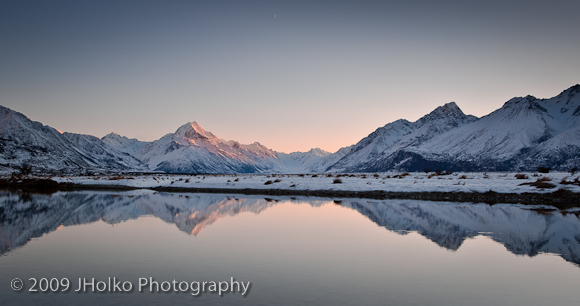
In the three days we stayed at Mount Cook in the plush accommodations of the Mount Cook lodge we were up before dawn every morning to capture the best light of day. We were rewarded every morning with crisp clear cold mornings and stunning transparent alpine light. This photograph is one of my favourites from our time at Mount Cook and was taken looking into the Tasman Valley just as the sun was rising behind the mountains. Reflecting back on the time we spent photographing this area I have to smile to myself about how easy this was to photograph and how lucky we were to have such consistently clear mornings in the dead of winter. This location was quite literally by the side of the road and no more than a minutes scramble down the side of the road to the river. It just doesn’t get any better or easier. Although it is quite hard to see in this small compressed jpeg on screen, the crescent moon almost directly at the top and centre of frame adds that wonderful dimension of the transitional period between night and day. A higher resolution version is on my website in the New Zealand Portfolio.