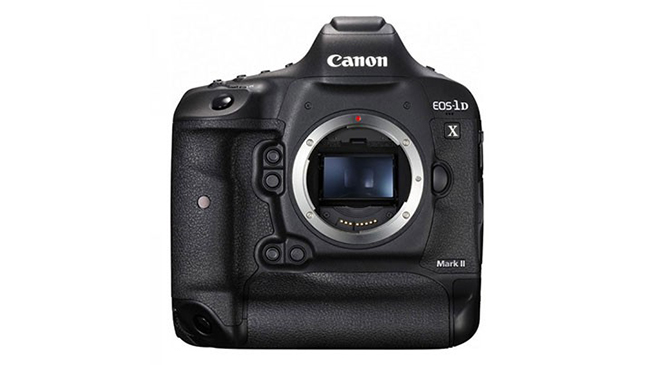
Canon have just announced the EOS 1DX MKII – The successor to the EOS 1DX. The world’s best wildlife camera just got better! This is a very exciting announcement and I am very much looking forward to putting the new camera through a full field test over the coming weeks. Full Details included below:
Update: The Canon EOS 1DX MKII is now available for Pre-Order.
Immense power. Phenomenal speed. A remarkable combination of innovation and refinement.
The new EOS-1D X Mark II camera is nothing but legendary every step of the way. Building on a heritage of sophisticated innovation, the EOS-1D X Mark II is blazingly fast. Up to 14 fps*(up to 16 fps* in Live View mode) can be captured at a burst rate of up to 170 RAWs with a CFast™ card, and an improved 61-point AF system helps deliver clean, sharp images quickly, even in dim light. This remarkable speed means faster recording too: 4K video can be recorded at up to 60 fps with smooth AF and strikingly clear detail. Combined with superb low-light performance thanks to its powerful sensor and expandable ISO range, the EOS-1D X Mark II performs brilliantly, swiftly and stunningly no matter when or where the photographer is shooting. From the stadium, safari or studio to virtually everywhere in between, the EOS-1D X Mark II maintains and enhances all the hallmarks of what Canon has to offer, marking a new page in the legacy of the EOS series of cameras.
- Fastest shooting EOS-1D, capable of up to 14 fps* full-resolution RAW or JPEG, and up to 16 fps* in Live View mode with new Dual DIGIC 6+ Image Processors.
- Achieves a maximum burst rate of up to 170 RAWs in continuous shooting at up to 16 fps, and 4K movies using CFast™ cards in the new CFast 2.0™** slot.
- Experience less noise in higher ISO images via a new 20.2 Megapixel full-frame CMOS sensor, with an ISO range of 100–51200; expansion to ISO 409600.
- Improved AF performance through 61-point High Density Reticular AF II system with 41 cross-type points, improved center point focusing sensitivity to -3 EV and compatibility down to f/8***.
- Accurate subject tracking for stills and video with new EOS Intelligent Tracking and Recognition AF with 360,000-pixel metering sensor.
- 4K video (4096 x 2160) up to 60 fps (59.94), with an 8.8-Megapixel still frame grab**** in camera. Full 1080p HD capture up to 120 fps for slow motion.
- Dual Pixel CMOS AF & Movie Servo AF for high speed, high frame rate and continuous autofocus during video shooting.
- View and control high quality stills and videos via the 3.2-inch touch panel LCD with 1.62 million dots.
- Increased resolution and fine detail, with lens aberration correction and diffraction correction via new in-camera Digital Lens Optimizer technology.
- Built-in GPS***** provides geotag information including auto time syncing with Universal Time Code via satellites.
- The new optional Wireless File Transmitter WFT-E8A is compatible with IEEE 802.11ac/n/a/g/b, supporting both the 2.4 GHz and 5 GHz Wi-Fi® bands.
- Durable and rugged magnesium alloy body with dust- and-weather resistance for demanding shooting situations.
* Continuous shooting speed may vary depending on the shutter speed, the aperture, the lens being used, the battery charge and various camera settings.
Fastest shooting EOS-1D, capable of up to 14 fps* full-resolution RAW or JPEG, and up to 16 fps* in Live View mode with new Dual DIGIC 6+ Image Processors. Up to 14 fps* Full-resolution RAW or JPEG, Up to 16 fps* in Live View Mode
Delivering outstanding performance at speeds of up to 14 fps*, and up to 16 fps* in Live View, the EOS-1D X Mark II camera is loaded with technologies that help facilitate speedy operation at every step of image capture. The EOS-1D X Mark II features a new mirror mechanism designed for highly precise operation with reduced vibration even at incredibly fast speeds. The shutter unit is rated for 400,000 frames and captures at up to 16 fps*, while the CMOS sensor has high-speed signal reading that enables speedy image capture. A fast AF/AE system, Dual DIGIC 6+ Image Processors and high-speed recording with its new CFast™card slothelps ensure that camera operations are performed quickly and precisely.
Dual DIGIC 6+ Image Processors
Key to the performance benchmarks achieved by the EOS-1D X Mark II camera, Dual DIGIC 6+ Image Processors not only convert the light that passes through the camera’s sensor into high-quality photos and movies, but also enhance the camera’s overall performance. Improvements include high-speed processing, up to 16-fps* operation for stills and 4K/60p movies, lens distortion and diffraction correction during operation with virtually no effect on the camera’s speed, plus fast write times and much more.
* Continuous shooting speed may vary depending on the shutter speed, the aperture, the lens being used, the battery charge and various camera settings.
Achieves a maximum burst rate of up to 170 RAWs in continuous shooting at up to 16 fps, and 4K movies using CFast™ cards in the new CFast 2.0™** slot.
The EOS-1D X Mark IIcamera can capture an incredible amount of images and movies with amazing speed. When recording to CFast 2.0™* cards through its new CFast™ card slot, the EOS-1D X Mark II can record up to 170 full-size RAW files, and JPEGs up to full card capacity at 16 fps. 4K/60p and Full HD/120p video can also be recorded with virtually no restriction, and with exFAT format support, movie files of larger than 4GB can be recorded without the need to merge files. Performance with CF cards through the camera’s CF card slot is impressive as well: the EOS-1D X Mark II can capture up to 73 full-size RAW files and JPEGs up to full card capacity when recording to CF UDMA7 media.
As of February 2016, compatibility has been verified for the following CFast™ memory cards:
Proper operation cannot be guaranteed for all recording media. Long-term usage may reduce a CFast™ card’s write speed. We recommend users regularly fully format and refresh their card using the “Full Format and Refresh Tool.”
* Canon is an authorized licensee of the CFast 2.0™ trademark, which may be registered in various jurisdictions.
Experience less noise in higher ISO images via a new 20.2 Megapixel full-frame CMOS sensor, with an ISO range of 100–51200; expansion to ISO 409600.
20.2 Megapixel Full-Frame CMOS Sensor
The EOS-1D X Mark IIcamera features a Canon-developed 20.2 Megapixel full-frame CMOS sensor that not only helps it record more pixels, but also includes gapless micro lenses for enhanced low-light performance. This results in noise reduction in dark portions of the image even at high ISO speeds, and increased sensitivity that contributes to the EOS-1D X Mark II’s high-speed image capture rate, accelerating frame-to-frame performance as well as enabling 4K movies (60p/30p) and improved playback. The new sensor is also Canon’s first full-frame sensor to include Dual Pixel CMOS AF for high-speed, precise AF during Live View still and movie recording.
ISO Range of 100–51200; Expansion to ISO 409600
The EOS-1D X Mark IIcamera delivers high standard and expanded ISOs, and a score of options to enhance shooting in varied and fast-changing lighting situations. With a standard range of ISO 100–51200, the EOS-1D X Mark IIis incredibly sensitive, and thanks to a high signal-to-noise ratio as well as powerful noise reduction, the EOS-1D X Mark II can shoot at expanded sensitivities down to ISO 50 (L) and up to 102400 (H1), 204800 (H2) and even 409600 (H3)! Beyond the obvious advantages of its wide ISO range, the EOS-1D X Mark II has automatic ISO settings, found on the dedicated ISO menu. Minimum and maximum ISO settings can be specified, as can a user-defined range, plus full auto and manual.
Improved AF performance through 61-point High Density Reticular AF II system with 41 cross-type points, improved center point focusing sensitivity to -3 EV and compatibility down to f/8***.
Improved AF Performance
The EOS-1D X Mark IIcamera incorporates a number of significant improvements to help deliver highly precise, reliable AF and AF tracking, both faster and available in more situations. It features a new 61-point High Density Reticular AF II system with 41 cross-type points that expands the AF area approximately 8.6% in the top and bottom of the central AF area, and approximately 24% at the top and bottom of the peripheral frame. A wider subject tracking area improves the AF system so that challenging focus tracking in scenes with sudden changes of speed and subject position is easier than ever. The AF system’s low-intensity limit has been improved to EV-3 and all 61 AF points are compatible down to f/8* for excellent low-light performance. The EOS-1D X Mark II’s AF algorithm has also been improved: it’s equipped with AI Servo AF III+, which remembers the AF path and helps refine precision. Whether choosing individual AF points manually, using the Large Zone AF area or any of the camera’s automatic AF selection modes, the EOS-1D X Mark II is designed to exceed users’ expectations for high-precision AF.
Improved Intelligent Viewfinder with Enhanced Visibility for AF Point Display
The EOS-1D X Mark IIcamera features a new Intelligent Viewfinder II for convenient composition and setting changes without taking an eye off the subject at hand. The camera’s viewfinder can show significantly more information in the LCD display and presents AF points in red, increasing visibility in dark locations where AF is typically difficult and in situations where the ambient light makes the AF frame difficult to see. Features like the electronic level, a grid, flicker detection, white balance, metering mode, AF information and more can be glanced at easily without drawing attention away from the subject.
* Except when using the Canon EF 50mm f/2.5 Macro, EF 100mm f/2.8 Macro, EF 100mm f/2.8 Macro USM, EF 100mm f/2.8L Macro IS USM and EF 28-80mm f/2.8-4L USM lenses.
Accurate subject tracking for stills and video with new EOS Intelligent Tracking and Recognition AF with 360,000-pixel metering sensor.
The EOS-1D X Mark II camera has an amazingly advanced 360,000-pixel RGB+IR metering sensor and processor that greatly contribute to the camera’s impressive AF performance for both stills and video. Thanks to a high resolution and infrared sensitivity combined with a refined detection algorithm, this new sensor improves the color and shape recognition of the EOS-1D X Mark II’s iSA (Intelligent Subject Analysis) system, increasing the camera’s ability to recognize subjects for faster, more precise AF, metering and exposure compensation. This additional exposure and subject information also helps the EOS-1D X Mark II’s iTR (Intelligent Tracking and Recognition) AF system maintain focus on a moving subject with a greater level of consistency.
4K video (4096 x 2160) up to 60 fps (59.94), with an 8.8-Megapixel still frame grab**** in camera. Full 1080p HD capture up to 120 fps for slow motion.
The EOS-1D X Mark II is an incredibly capable camera for moviemaking. Thanks to its Dual DIGIC 6+ Image Processors and its advanced sensor, it can capture huge 4K (Motion JPEG)video at up to 60 fps, recording smoothly to CFast™ cards. It’s the first EOS camera able to record Full HD video at 120 fps, easily displaying minute details imperceptible to the human eyeand ideal for slow-motion video capture. With the camera’s new touch panel display, AF points can be easily selected while the camera’s rolling, and focus can be quickly confirmed with the EOS-1D X Mark II’s 4K still frame grab feature*, wherein an 8.8-Megapixel still image can be selected for review and saved. Low-light performance is improved as well, with video recording at ISOs of up to 12800 in 4K and 25600 in Full HD.The EOS-1D X Mark II also features uncompressed HDMI output for Full HD videos, helping to facilitate video editing with minimal image degradation. Not to mention, it can also save videos as MP4s for easy playback on mobile devices.
* Saving a still image from a single movie frame does not result in the same image quality as a normal still image.
Dual Pixel CMOS AF & Movie Servo AF for high speed, high frame rate and continuous autofocus during video shooting.
With significant improvements in AF operation, the EOS-1D X Mark IIcamera can be an indispensible and remarkably portable moviemaking tool. Continuous AF, even during 4K recording, is made easy thanks to the EOS-1D X Mark II’s Dual Pixel CMOS AF, which is compatible with all Canon EF lenses. Focus points can be selected automatically, or specified on the camera’s new touch panel LCD screen. Critical focus throughout the frame can be easily confirmed by enlarging stills grabbed from video recordings. The EOS-1D X Mark II’s Movie Servo AF is compatible with all frame rates and resolutions, and can be customized to set tracking sensitivity, AF speed and even Face Tracking priority. These advanced features help make the EOS-1D X Mark II a truly versatile and convenient camera for 4K and Full HD moviemaking.
View and control high quality stills and videos via the 3.2-inch touch panel LCD with 1.62 million dots.
The EOS-1D X Mark II camera’s 3.2-inchtouch panel TFT LCD monitor has approximately 1.62 million dots, anti-reflective construction and features Canon’s Clear View LCD II technology for bright, sharp display in any number of shooting situations. Its new touchscreen function allows AF point switching and image magnification during Live View shooting and movie shooting, providing convenient operation. The LCD monitor can be ideal for reviewing settings and images, as well as for shooting in Live View mode. In Live View, grid lines can be displayed in 9 sections, 24 sections or 9 sections with diagonals, as well as the dual-axis electronic level, which helps ensure accurate level by displaying both roll and pitch in 1-degree increments. For image review, the EOS-1D X Mark II has a dedicated Magnify/Reduce button. While pressing the button, zooming in or out (up to 10x) is achieved simply by turning the Main Dial. Images can be protected or erased quickly, individually or in batches, and slideshows can be created with some or all images and can be sequenced by date, folders, movies, stills,protection or rating. A feature guide can be accessed for the selected menu, providing detailed reference information when needed.
Increased resolution and fine detail, with lens aberration correction and diffraction correction via new in-camera Digital Lens Optimizer technology.
To combat any possible image degradation from lens aberration and diffraction, the EOS-1D X Mark II camera is equipped with a number of in-camera optical correction functions for clear and high-quality images. The EOS-1D X Mark II even stores lens aberration data, helping to eliminatethe need to register lens data on previously released lenses, and correcting images with virtually no delay in-camera. The EOS-1D X Mark II not only corrects peripheral brightness and chromatic aberration, but also features distortion correction plus diffraction correction, which has been included for the first time in an EOS camera. Distortion correction helps resolve barrel and pincushion distortions,while diffraction correction virtually eliminates the blurring effects from diffraction that can be created when capturing an image at a small aperture. The camera’s Dual DIGIC 6+ Image Processors help ensure these corrections can be made with virtually no effect on operational speed. In-camera RAW processing is also made fast and convenient with Canon’s Digital Lens Optimizer, helping to improve image quality and giving photographers the ability to work confidently in more complex environments.
Built-in GPS***** provides geotag information including auto time syncing with Universal Time Code via satellites.
Providing crucial location and time data, GPS has become an indispensible aspect of the professional workflow, especially for professionals who work on location and capture thousands of images each day. The EOS-1D X Mark IIcamera has GPS* built in, helping photographers and filmmakers not only tag their images with critical location data, but also adjust the time and timestamp on the camera automatically. Thanks to built-in GPS*, and Wi-Fi® connectivity throughthe optionalWireless File Transmitter WFT-E8A accessory, the EOS-1D X Mark II can use both GPS andWFT (Wireless File Transfer)together, making it easy to upload a great amount of images both quickly and from increasingly far-flung locales. Offering compatibility with American GPS satellites, Russian GLONASS satellites and Japanese quasi-zenith satellites Michibiki, the EOS-1D X Mark II’s GPS information is reliably accurate virtually anywhere you go.
* In certain countries and regions, the use of GPS may be restricted. Therefore be sure to use GPS in accordance with the laws and regulations of your country or region. Be particularly careful when traveling outside your home country. As a signal is received from GPS satellites, take sufficient measures when using in locations where the use of electronics is regulated.
The new optional Wireless File Transmitter WFT-E8A is compatible with IEEE 802.11ac/n/a/g/b, supporting both the 2.4 GHz and 5 GHz Wi-Fi® bands.
The Wireless File Transmitter WFT-E8A, the EOS-1D X Mark II camera’s new optional accessory, provides both a fastthroughput for image uploading andseveral new features that make dynamic wireless photography simple and fast. It has 5GHz 802.11ac support for high-speed image transfer, a revamped user interface that enables speedy set-up and configuration of wireless networks and even compatible smartphone connection.Accommodating both iOS* and Android** devices, the Wireless File Transmitter WFT-E8A makes it simple to use a smartphone as a remote control for still and video capture. It can even transfer recorded images back for viewing on the device’s screen. The Wireless File Transmitter WFT-E8A is both compact and durable, with excellent dust- and water- resistance for unfettered operation in difficult environments.
* Compatible with iOS versions 7.1/8.4/9.0, Android smartphone and tablet versions 4.0/4.1/4.2/4.3/4.4/5.0/5.1. Data charges may apply with the download of the free Canon Camera Connect app. This app helps enable you to upload images to social media services. Please note that image files may contain personally identifiable information that may implicate privacy laws. Canon disclaims and has no responsibility for your use of such images. Canon does not obtain, collect or use such images or any information included in such images through this app.
** Compatible with Android smartphone and tablet versions 4.0/4.1/4.2/4.3/4.4/5.0/5.1.
Durable and rugged magnesium alloy body with dust- and-weather resistance for demanding shooting situations.
For professionals who demand nothing less than the best, the EOS-1D X Mark IIcamera is designed to perform superbly even in the most treacherous environments, every time. The body is constructed of rigid, high-strength magnesium alloy for rugged performance and features a grip design for easy finger placement and reduced hand fatigue. Its shutter has lightweight, carbon-fiber blades, and is rated to maintain up to 16 fps performance without compromise, for up to 400,000 cycles. The EOS-1D X Mark II and accessories like the new Wireless File Transmitter WFT-E8A have extensive gasketing for improved dust and water resistance, even at their connection points.
Price:
- $5999 USD (List Price in Australia TBA – I would guess around $8000 AUD)
What’s in the box:
- EOS-1D X Mark II Camera Body
- Battery Pack LP-E19
- Battery Charger LC-E19
- Wide Strap
- Eyecup Eg (Not shown)
- Cable Protector
- Interface Cable IFC-150U II
- EOS Digital Solution Disk (Not shown)


 Enter, BenQ who now have a solution for photographers on more modest budgets in the form of the
  Key Features
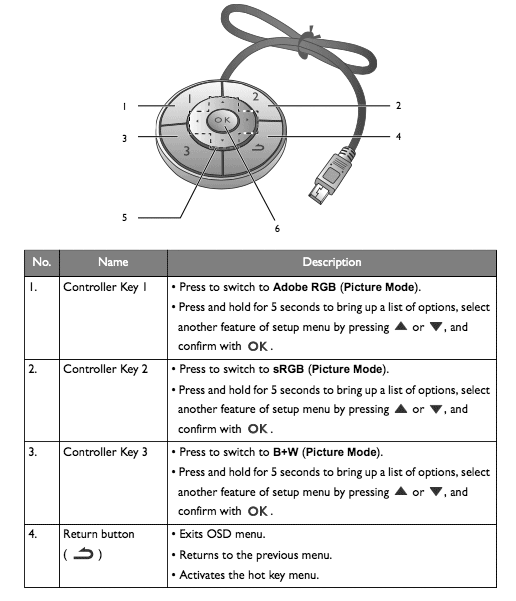
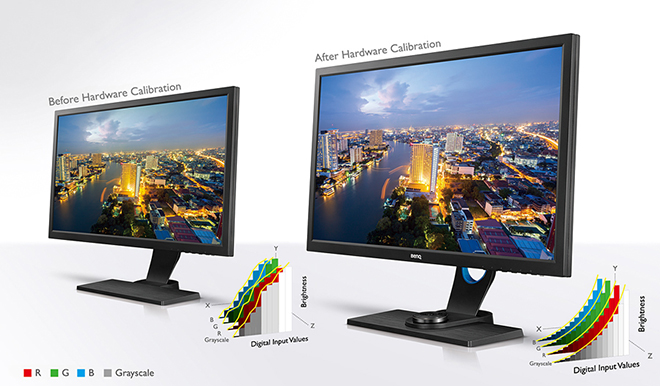
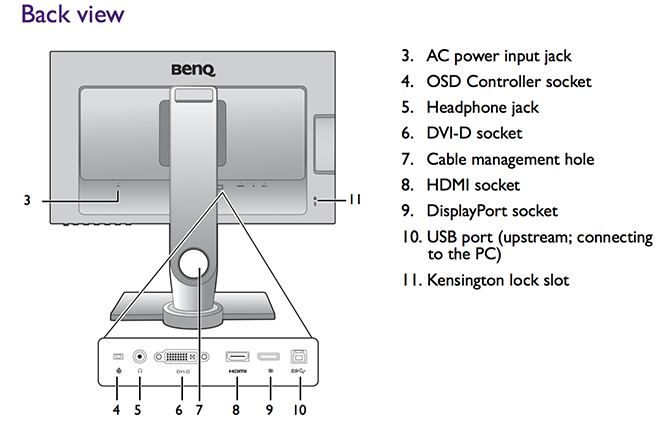 Like the Eizo, the BenQ SW2700PT is a hardware calibration equiped monitor. Hardware calibration allows you to adjust the monitor’s image processing chip without changing graphics card output data. Calibration keeps images consistent with originals without being affected by graphic card settings. Two monitor preset modes allow calibration results to be saved directly into the monitor. As discussed in the review on the
  In terms of both sheer colour range and accuracy of colour reproduction, the BenQ’s performance is excellent. Testing shows superb SRGB performance and approximately 99% of the Adobe RGB gamut range is successfully displayed. The much larger Adobe RGB space is much harder to reproduce and most monitors don’t reach even 80% of it. At this price point the BenQ sets a new standard in my experience.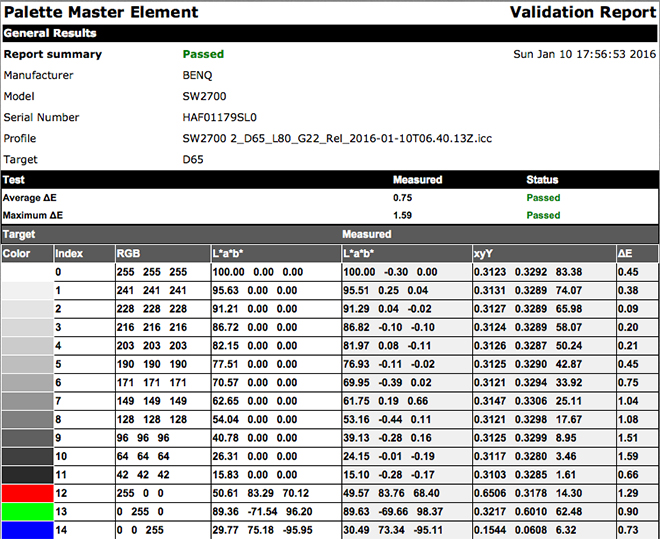
 REAL WORLD USE
 www.WILDNATUREPHOTOTRAVEL.com