Nature Photography In the Spirit of Full Disclosure

A very similar opinion piece to this was originally penned by Andrew Parkinson. With apologies to Andrew, I do not recall where it was originally published, but I agreed so strongly with the sentiment that I took a copy of the article at the time I read it; which I revised and updated with my own thoughts below in relation to the genre of Nature photography.

I have always considered myself a ‘full disclosure’ photographer; someone who puts honesty and integrity before ego, authenticity before falsehood and ethics before photographs. It is not a particularly complicated process, I just tell the truth about my photography and my photographs are an accurate depiction of Nature and what I experienced at the time. When a viewer stands in front of one of my photographs they can know in their heart that what they are looking at is an accurate depiction of Nature. This might sound somewhat lofty to some, but as a Nature photographer, I believe in my heart that I have a responsibility to accurately depict Nature and that my viewer should not be deceived. They have a right to the truth and to know (and expect) that the photograph they are viewing accurately depicts the truth of the moment.

Like all digital images, my RAW files require some optimisation prior to publication. Usually this optimisation involves little more than setting a white and black point, tweaking shadows and highlights, subtle white balance adjustment, some capture sharpening and perhaps a small contrast or saturation adjustment. Other than the above, nothing is added or taken away – save the odd dust spot (I do crop). There is absolutely no use of compositing in my photography. There is no HDR and no Focus Stacking. If you see a photograph of mine that looks like the depth of field was impossible – I did it with a tilt shift lens in camera. I will walk over and pick up the stick that is in the way of my photograph and remove it. I wont clone it out after the fact. I will reposition myself to to improve my background, but I wont drop a new background in during post production. I learned the craft of photography shooting 35mm chrome transparencies. If I was a third of a stop out in my exposure the slide went in the trash; so I learned very early on to get it right in camera; and to this day my mantra is quite simply to get it right in camera. If the light was no good or the wildlife did not co-operate then thats just part of the process and I will try again another day. I don’t feel the need to process and publish a photograph just because it was the best I could do on any given day. It is the process of being out in the field and trying to capture a great photograph that is important to me. The process is as important as the end result and I have to have had a great day out in the field even if I didn’t make a great photograph. Nature photography is after all about being out in Nature. It is certainly not about creating a work of fiction in the computer and peddling it to the masses as a Nature photograph. This process is not Nature photography. It is quite simply digital compositing.

My intention is always to maintain the integrity of both the original capture and importantly the original experience. The act of processing is simply a finishing touch on an authentic end product. This is what is known as ‘photography’.

However, it is fair to say that these somewhat prosaic values are not shared by all image makers. For some, it seems the original RAW file is nothing more than raw ingredients. It is part of the cake waiting to be baked, a mere brushstroke in the direction of the finished masterpiece. For some, there are no rules about what can or cannot be done. If their imagination can conceive it, then creating it seems to be the status quo. Never, it seems is this dubious approach more prevalent than in the peculiar and murky world of fine art photography. And never have I seen it so badly abused as the pages of social media. Fine art photography it seems has become a dumping ground of convenience for images that are excessively post produced and that have long since left the realm of reality. 

Of course, it goes without saying that it is none of my dam business what other photographers do (or do not do) with their photographs, but in our rapidly evolving world I often look on with more than bemused interest at many of the trends that ebb and flow in our photographic space. With the popularity of digital photography sky rocketing, we are increasingly bombarded with a plethora of images so unreal that they have long since left the realm of photography. For lack of a better term they have entered the loose arena of digital composited art. Overworked images with radioactive saturation and hyper-realistic contrast are produced en-mass and sold to the world as Nature images; which they most certainly are not. Quite honestly, nothing irks me more than when one of these images turns up somewhere in a high profile Nature competition and is subsequently gushed over by the seemingly oblivious judges who must clearly be ignorant to the reality of Nature.  Sometimes it really does feel like its the blind leading the blind out there…

One has to only scroll through the pages of social media to witness the level of absurdity that is applauded, the falsehood that goes unnoticed and the rather spurious invention that is praised. In a world largely ignorant to the duplicity of the desperate, my critical eye has grown tired of this nonsense. More so, now than ever before the natural world is dependant upon the honesty of photographers to produce an authentic rendition of what they saw. We need to inspire with reality, and not distract with deception. Oh, I can hear the naysayers now; ‘but its my artistic vision!’ What nonsense. If it was truly artistic vision and expression there would also be accompanying full disclosure and they’re rarely if ever is. Instead, the photographer sits quietly in the shadows; lapping up social media likes and comments through the disingenuous artefact.

I believe strongly that we should reward the photographer for their skill and ability to capture the photograph in the field. Not reward them for being a software expert in post production. A great photograph doesn’t need much post production! It is already a great photograph!

Of course it isn’t easy; It takes commitment, skill, dedication and passion to produce emotional and powerful Nature photographs in camera. Many photographers simply are not willing to make this commitment and seek instead a quick path to glory through the crucible of post production.

When it comes to wildlife photography, “Fine Art’ and “Social Media” it seems are most concerned only with the apex species (the gallery walls are no place for even a Pallas cat). The gallery wall images when viewed without receipt, often seem mundane and banal; badly lit, badly executed and totally lacking emotion. It might be a bear or it might be a lion; it might be wild or it might be captive; the audience will likely never know. The magic does not occur in the field (where it should) – rather this is where the RAW materials are mined. Instead the wizardry occurs on the screen of a computer, and the photographer is reduced to nothing more than a composer as the artifice is orchestrated. Multiple images can be merged, miraculous anomalies will happen with the light and the sky really is no limit. It is here that the final images rise like a phoenix from the embers of mediocrity. For me, these images are a lie. They are an unrealistic fantasy composed of exaggeration, invention, manipulation and deceit. They are sold to the public under the disingenuous guise of reality. And when someone dare call out the photographer for their falsehood they are cast down amidst cries of personal artistic expression. The truth is, the photographer was caught out and has run for refuge into that safe haven of ‘creative vision’.

When these undisclosed creations are used to market workshops they are at their most insidious. They’re intent to deceive is laid bare by those in the know. Workshop participants will never capture these images, despite their hopes and dreams. They were sold a lie. They were tricked and deceived and that is unacceptable to me and it should be unacceptable to them and to you.

I believe it is important to clarify that my thoughts and opinion relate solely to the genre of Nature photography. However, my comments also apply to landscape photography when it falls into the Nature category and they certainly apply to all wildlife Nature photography. Commercial photography, professional portraiture and other such genres work to a very different set of principles. Again, I want to credit Andrew Parkinson for so eloquently penning his original piece and thank him for inspiring me to pay homage to it with my own ideals.

With thanks to Chris Wahl for the photograph below from this years expedition to photograph Arctic Fox in the north-west of Iceland. This particular female fox is one I have been photographing since 2016. Over the last four years I have built trust with this fox to the point she will now come to within just a few feet of me,  lie down in the snow, curl up and go to sleep. She is now toward the end of her life and this is probably her last winter.  I will miss her dearly and pray I may see her again for one more season next year.

Arctic Fox 2020

Yellowstone in Winter 2021 Workshop Sold Out!

My 2021 Winter workshop to Yellowstone in Winter next year is now Sold Out. It is hard to believe it was 2015 (Read the Trip Report) when I was last in Yellowstone in Winter. Ever since I left this magical place just over five years ago I have been itching to return to photograph the wildlife and landscape in winters icy clutches. My last visit back in 2015 was a very low snow year and temperatures were quite mild. I have high hopes for real sub zero temps and great snow next year.

Speaking of snow; I arrived in Iceland late yesterday afternoon for my Arctic Fox expedition and have found winter is well and truly in full swing. Unlike recent yers there is good snow cover around Reykjavik and I am told the snow cover up in the north west fjords is fantastic. Looking forward this morning to the short flight north and then the boat trip out to the nature reserve.

Departing for Arctic Winter Expeditions with Canon EOS 1DX MK3 Cameras

My brief time at home in Australia has come and gone and in a few minutes I am heading back to the airport to start the trek back north to north-western Iceland for my sold out Winter Arctic Fox workshop and subsequent sold Polar Bears and Musk Ox expeditions to the East Coast of Greenland in Winter. If you are interested in photographing Arctic Fox in a beautiful winter setting drop me an email for further details on the 2021 expedition – flyer below. The north-west of Iceland is the definitive place to photograph Arctic Fox in a beautiful, quiet and secluded setting.

My equipment for these expeditions will be quite familiar to those of you who regularly follow my blog with the exception that I have now sold  both my Canon EOS 1DX MK2 cameras and have purchased two new Canon EOS 1DX MK3 bodies. Although I have previously tested the new 1DX MK3 cameras autofocus system (HERE) and its noise performance (HERE), I am really looking forward to putting these cameras through real world use in the Arctic winter.  There really is no substitute for being out in the field with a camera to test real world performance. I am packing the 400mm f2.8 specifically for the Arctic Foxes and the 600mm f4 specifically for the Polar Bears on the East Coast of Greenland. I had toyed with also packing my Canon Mirrorless R, but in the end decided I just was very unlikely to even pick it up with two 1DX MK3’s always at the ready.

2 x Canon EOS 1DX MK3 Bodies w/ 2 spare batteries

1 x Canon 16-35mm F4L IS

1 x Canon 24-70mm F4L IS

1 x Canon 70-200mm f2.8L IS MK3

1 x Canon 400mm F2.8L IS MK3

1 x Canon 600mm F4L IS MK3

1 x Canon 1.4 TC MK3

All of the above fits in my Gura Gear camera backpack with the exception of the 400mm f2.8 which fits nicely in my Gura Gear Chobe laptop bag. See you in Iceland!

BenQ SW321C 32″ Wide Gamut Adobe RGB UHD 4K Monitor Review

Ever since BenQ released the BenQ SW2700PT 27” back in 2016 (Reviewed here on my Blog and also on the Luminous Landscape website) they have been shaking up the photographic world with their high performance, budget priced monitors.  When I reviewed the SW2700PT and the SW320 (reviewed HERE)  I actually wrote that they offered exceptional performance at their price point – that still stands today.

BenQ SW321C Review – Recently BenQ released the update to the SW320, the  32” SW321C 4K UHD Wide Gamut Monitor. I have been testing a production sample of this monitor in my studio for the last couple of months and have now had the time to write a complete review of this new display. To be clear, the SW321C is the direct replacement for the previously reviewed SW320. Everything I wrote about the SW320 still stands with the SW321C; with the added benefit of several improvements (notably an improvement in corner uniformity). It is also worth noting some additional specification differences between SW320 and SW321C:

  1. SW320 did not have USB-C port but SW321C has USB-C port with 60W power delivery.
  2. SW321C has A.R.T. panel which has less glare and reflection.
  3. SW321C have Paper color sync software (I will review this in full at a later date)

The SW321C builds upon the success of its predecessor (the BenQ SW320) whilst continuing to set a new performance benchmark for wide gamut 4K monitors at a low price point. In addition to its UHD resolution the SW321C takes image quality to the next level with the addition of HDR capabilities (not found in the much more expensive Eizo CG-318 I also reviewed a couple of years ago). According to the supplied literature from BenQ, High Dynamic Range (HDR) increases the overall dynamic range between black and white so the resulting image appears closer to what your eyes see in the natural world*. In real world tests the benefit is tangible and noticeable. HDR is one of those features that once you get used to, you wonder how you ever lived without. *To view HDR content from your device, ensure that you use the HDMI cable provided with the SW321 monitor or a High Speed HDMI Cable or Premium High Speed HDMI Certified Cable.benqsw320-2In short, the new SW321C 4K UHD monitor offers extraordinary performance with a true 10-bit panel with 99% Adobe RGB, 100% sRGB colour space coverage as well as supporting HDR content. The knock out punch is that it continues to do so at a price point previously unheard of for a monitor of this size with these features. You simply cant find these specifications and performance at a price point anywhere near what BenQ are asking and that makes this a very special product indeed.

The overall quality of colour reproduction on screen has been further improved from the SW320. In side by side comparisons the SW321C outperforms its older brother in colour fidelity and most notably in corner uniformity.

Specifications – There is no need to regurgitate a complete list of the SW321C specifications as those are already available on BenQ’s website. See the SW321C page on BenQ’s website for full details.

Out of the Box – Every single BenQ SW321C ships with an online factory Calibration Report. This detailed report includes some very useful information including Uniformity Measurements and Dealt E reports that tell you just how your individual SW321C performed when tested before it left the factory. It is worth noting that the report is serial number specific and not batch specific so BenQ are testing each and every monitor. These sort of reports are normally only found in much more expensive displays such as those from the NEC SpectraView Line and the Eizo Colour Edge monitors. The mere fact the BenQ SW321C ships with this sort of individual test report speaks volumes to the sort of high quality display BenQ have produced and the care and attention to detail they have invested in this new display.

Out of the box the BenQ SW321C is a breeze to set up and in less than ten minutes I had the stand fully assembled, the display plugged in (via HDMI) to my MacBook Pro and the system fully operable. It seems to me that with every new model BenQ have continued to refine and improve their display stand and ease of installation.  The ‘tool-free’ assembly is most welcome and other manufacturers would do well to take note.

SW321C Performance – Like many displays the SW321C ships in ‘flame-thrower’ mode and out of the box was far too bright for my viewing environment. I know manufacturers do this to try and impress viewers who will no doubt see the display first in a brightly lit fluorescent showroom but I really wish they wouldn’t. Once calibrated however to a more reasonable 120 Candelas and D6500 Kelvin I was able to properly assess the SW321C’s performance and make direct comparisons against other displays.

BenQ Palette Master Software – To get the very best results from the SW321C, the profiling software you use needs to access the internal monitor hardware Look up Tables (LUT), and for that you need the supplied Palette Master Element software. For Apple users, the supplied software is installed as an application. I don’t own a Windows machine so did not test the software under a Windows environment.

The SW321C ships with the BenQ Palette Master Software; but it can also be downloaded for free from the BenQ website. By using the Palette Master Element software and a calibrator (X-rite i1 Display in my case), you can tune and maintain the colour performance of the monitor at its most optimal state. The BenQ SW321C currently supports the X-Rite i1 Display Pro / i1 Pro /i1 Pro 2 , and Datacolor Spyder 4/5, X-rite i1 studio, ColorMunki Photo, and Spyder X colorimeters.  I tested all of these during my time with the SW321C and all performed without issue. BenQ provide a user friendly instruction manual with the Palette Master Software that you can download from their website.  There is both a basic and advanced mode to choose from. 

Driving a 4K UHD Display – Before you rush out and purchase any UHD or DCI 4K display you should make sure your computer can actually drive the display at its native resolution. In my case I tested the SW321C with both a 2013 6-core Mac Pro with 64 gigabytes of RAM and dual AMD FirePro 500 video cards and a late 2019 13” MacBook Pro and both were able to drive the display at its full native resolution. 

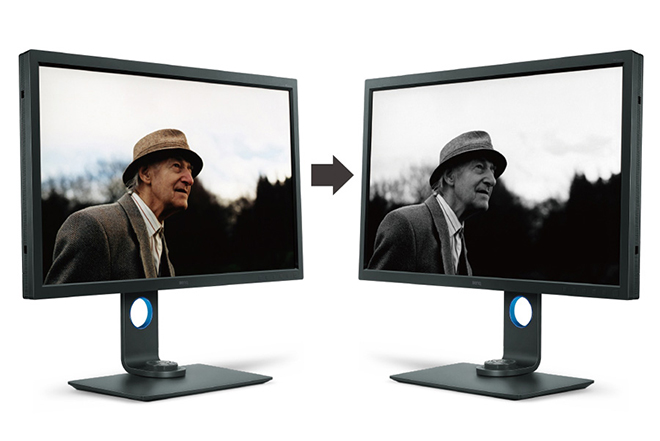
Advanced Black and White Mode – The BenQ SW321C also includes an advanced Black and White mode that allows you to view your photos in a black and white film effect. You can choose from three different black and white presets to preview your photographs in before you perform actual adjustments in Lightroom or other image editing applications. I am not a black and white photographer so I didn’t test this feature other than to quickly check it actually functions as advertised; which it does. Black and White photographers should definitely test this feature to see if it fits within their workflow.bwmodeGamut Duo – The BenQ SW321C is equiped with a very cool feature called GamutDuo. GamutDuo enables you to view content simultaneously on the screen in different colour spaces side-by-side for easy comparison. I found this new feature quite useful to soft proof images going from Adobe RGB colour space to SRGB for the web. By viewing the two images side by side it is very easy to see the differences. Users who have to re-purpose their photographs for different colour spaces are likely to find this a very useful feature. To activate the GamutDuo feature you switch to PIP/PBP mode.gamutduoHotkey Puck – Like the BenQ SW320, the BenQ SW321C ships with a The Hotkey Puck that allows the user to switch between Adobe RGB mode, sRGB mode and Black & White modes effortlessly. The hot key buttons can also be customised to map other modes or OSD settings, such as brightness and contrast to bring added convenience to photographers. The Hotkey Puck is a nice addition and it is worth taking a bit of time to properly understand its uses and how it might save you time in your own workflow.

Shading Hood – Knowing that ambient lighting can obstruct colour accuracy, all BenQ SW series photographic monitors include a detachable shading hood to reduce screen glare to deliver the most accurate colours possible. The shade hood included with the SW321C can be used in portrait orientation as well as in landscape orientation (a very nice design consideration). What I really appreciated is the solid build quality of the shade hood. It feels like a high quality addition to the display and not a cheap plastic after thought; like it does on the much more expensive Eizo CG-318 display. In fact, the Eizo CG-318 shade hood looks positively cheap and nasty in side by side comparisons. Once secured in place the shade hood feels extremely robust and is nicely finished inside with anti-reflective black flocking. BenQ are to be commended for providing a shade hood with the display of such a high quality. Another nice touch is the addition of a small operable window at the top of the shade hood to pass a colorimeter through for screen calibration. Quite honestly, the shade hood included with the SW321C is the best I have seen regardless of the brand or price of monitor.shadehood

The Bezel and Stand – Attention to small details is very important in high end displays and I was very pleased to see that the bezel of the SW321C is finished in a dark grey matt that minimises any potential bezel reflection. I am told from the factory that extensive testing was done on various bezel surfaces in order to achieve the best result and most optimal viewing experience for photographic professionals. This sort of attention to detail might sound trivial but it ensures an optimal result when you are working for hours at a time in front of the display. In addition to coating changes, the monitor’s stand has been redesigned in a minimalist style, with a sleek L-shaped neck that streamlines with the monitor frame.  It looks great on my desk and will likely fit well in most studio spaces. The stand is shipped in two pieces and is easily assembled without tools. There is some facility for cable management and over all the stand feels very solid and well made.

Real World Use – In Real world use the first thing you notice on turning on the SW321C is the incredible resolution that a UHD screen provides and the subsequent desktop real estate that this resolution enables. If you are used to working with a lower resolution display the vast real estate that this sort of display offers will be a revelation to you. Depending on how close you sit to the screen and the quality of your vision you may need to implement some scaling to increase the text size. In my studio I sit quite close to the monitor and have no problem reading text on screen without the need for any software scaling. Daily life in a UHD environment under MAC OS X just works provided you have good enough eye sight to read the small text. If (like me) you like to work on a single monitor then you recognise the high value of having significant desktop real estate; something the SW321C provides in spades. Colour rendition is excellent on the SW321C and the UHD resolution makes for a powerful and versatile work space.

My daily use for a monitor such as theSW321C involves the editing, post production and printing of digital files in Adobe Lightroom and Adobe Photoshop Creative Cloud. I also use applications such as in-Design, Premiere Pro and other image related programs and plug-ins. On the whole most of my time is in the majority spent in Lightroom and Photoshop and thus this is the area that my comments are most related.

Like its predecessor, the SW320, working in Adobe Lightroom on the BenQ SW321C is a joy and a pleasure. It has always bothered me that the side panels in Lightroom are fixed and not tear away (yes, they can be hidden, but I prefer tear off). The SW321C has so much screen real estate and resolution to play with that the fixed panels are now an absolute non issue for me. I used to have to hide the panels to gain resolution for the actual image on the horizontal axis for a standard 35mm ratio image. On the SW321C however, the extra screen real estate provides sufficient resolution to negate this need and the side panels can now be left open all the time. This might seem like a very small benefit, but in real world use it’s actually extremely beneficial to my workflow. Again, your mileage may vary.

The colour rendition of the SW321C is exceptional and when combined with the excellent uniformity the display offers it is extremely easy to judge tone and contrast when processing RAW files.  For those of you who place a large emphasis on printing (as I do) you will find the BenQ SW321C to offer truly outstanding performance. In fact, it offers performance that far exceeds its modest price tag.

Conclusion – The BenQ SW321C is a superbly constructed high quality UHD wide gamut monitor that offers users exceptional resolution, colour accuracy and uniformity at a price point that puts competitors to shame. The monitor is simple and easy to assemble and operated without issue out of the box with both my laptop and main desktop computers. Overall picture quality is exceptional with excellent linearity and uniformity across the screen that matches the much more expensive Eizo CG-318 in all but the very extreme corners (it is actually so close to the Eizo as to be nothing more than quibble). This is outstanding performance that photographers and other graphic artists will really appreciate in daily use.

The SW321C is also packed with features from the previous SW320 including GamutDuo and an Advanced Black and White mode that photographers are sure to find beneficial in their workflows.

When I reviewed the Eizo-CG318 Display I niggled that the HDMI ports really should have been version 2.0 and not 1.4 on a display at this price point. I was extremely pleased to see that the BenQ SW321C includes the very latest HDMI (again at a price point well below the Eizo).  

The display hood is extremely well constructed and provides a very solid black around the screen when working. The screen itself exhibits very low reflectance.

I am primarily a stills photographer who only occasionally works in video so I confined my testing to predominantly sill images. The video I did pass through the SW321C looked extremely good to my eyes and videographers should be extremely happy with the performance of this display.  During the review I tested several 4K video pieces as well as upscaled 1080p video content.

The BenQ SW321C monitor offers the big and accurate colour space I need in my photography and the power of the hardware LUT means there is no banding or posterisation in any of the test images I tried when reviewing the screen. Like my previous tests on the SW320, I tested the SW321C with a wide range of my own photographs as well as a large suite of ISF (Image Science Foundation) test images designed specifically to trip up displays (ISF test images are designed to show up weaknesses in displays not often found in general viewing). The SW321C performed without issue on all counts.

I feel it is extremely important that calibration software is intuitive and easy to use. In fact, the simpler the better in most cases as it means there is less chance of users making a mistake during the calibration process. To BenQ’s credit, the supplied Palette Master software is easy and intuitive as well as ensuring accurate calibration of the display. If you purchase an SW321C be sure to use the Palette Master Software to ensure you are accessing the Hardware LUT for the best possible results.

Overall the BenQ SW321C is a superb display that offers a huge UHD resolution workspace in combination with a wide gamut Adobe RGB display at a price point that puts the competition to shame.  That is quite a combination that I feel will again see BenQ continue to shake up the marketplace as photographers rush to embrace a display that offers performance and a feature set previously found only in much more expensive displays for those with much deeper pockets.

Full Disclosure – In the spirit of full disclosure I would like to be clear that BenQ provided me with the SW321C test unit at no cost (at least I have received no invoice to date). I also want to be clear that although I am officially an ambassador for BenQ they have in no way tried to influence my review and instead specifically asked me to be thorough and rigorous in my testing of the SW321C. I only ever accept products to review on the clear understanding that I will be completely impartial and report anything negative I find as well as anything positive.  Since I am using these products in my own workflow being clear, honest and forthright is my number one priority.

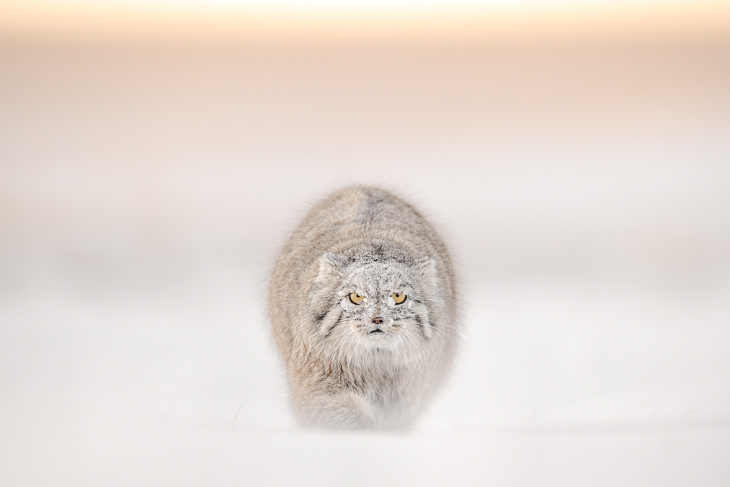
Photo of the Month February 2020 – Pallas Cat on the Move

This photograph of a Pallas Cat stalking in the snow was made in Mongolia last November 2019. It was only possible due to a number of different circumstances which conspired in my favour – it was at the end of the day nearly pure serendipity.  Firstly, my guide and I found the cat not long before sunset, just as the light was becoming optimal. We had been searching the lunar-like landscape all day in search of a cat and had found only tracks. Then with less than an hour before dark we discovered this cat. I asked my guide to go around the cat and to approach its position slowly from behind. I then went and lay down in front of the cat some hundred metres or so away. I was wearing full winter camouflage clothing and once I was lying down in the snow was virtually invisible. The cat had no idea I was there until it was less than 20 metres away.