
Unless you have been living under a rock (or lost on an iceberg) you are probably already aware of MacPhun’s new photo editing software Luminar (available only for the Mac). I have been using Luminar more or less since its release as a plug in for Photoshop and have been extremely impressed with its workflow and speed (and layers support). It has already completely replaced the Nik filters in my workflow and has greatly simplified my post production work. In short, I am a pretty big fan of Luminar. If you are not yet familiar with Luminar then its well worth taking some time to check it out and download the free trial. You can run Luminar as a stand alone application; or as a plug in for Lightroom and/or Photoshop. In my own workflow I find I prefer to run it as a Photoshop Plug in; but your mileage may vary. I may do a full review on Luminar at a future date if I get the time; but if you want to get a head start there are already a great range of videos on the power of Luminar HERE. Luminar already offers touch bar support for owners of the new MacBook Pro and later this week the new Pluto update will launch (free upgrade for existing users) with additional filters and features.
Category: Equipment
Photographic Equipment
The Emperors Expedition and South Georgia / Antarctica Packing List 2016
As is traditional for me, I like to post my packing list before an expedition and this particular list has probably give me more pause for thought than any in recent time. I am packing for both my Emperor Penguin Expedition and Photographers First light Expedition to South Georgia and Antarctica and although the two destinations are very similar (both in Antarctica) they require different approaches. Just as an aside, for those of you who have emailed me asking if I will be running another expedition to the Emperors in the future the answer is ‘maybe’ at this stage. I have pencilled in for a possible expedition in November 2018, but as yet nothing is confirmed. The best way to stay up to date on a possible future Emperor trip is to just drop me an email and register your interest.
In terms of subject matter, the Emperors expedition is absolutely all about Wildlife (as is South Georgia), but the Antarctica portion of the First Light Expedition is ship based with a significant emphasis on landscape and icebergs and that requires some different equipment (at least it does for me). I have decided to take the 85mm F1.2L MKII lens as I have long wanted to use this lens in Antarctica and the Emperor Penguins provide the ideal subject. The lenses depth of field at f1.2 is razor thin making it the perfect tool for getting just the eye sharp. In addition, I am also taking my 600mm F4L IS MKII lens as I have really fallen in love with the telephoto compression of this lens and love the effect it has of bringing the background close to the subject. A 600mm lens is absolutely not required for the Emperor Penguins or South Georgia – it just so happens I love the effect enough to schlep it all the way to the interior of Antarctica and South Georgia Island. I am also packing a Really Right Stuff tripod with Satchler FSB-6 fluid head for the 600mm lens in my checked luggage. With all of that in mind I settled on the following as my selection for these two expeditions:
Gura Gear Bataflae 32L Camera Bag (Carry on Luggage)
– 2 x Canon EOS 1DX MKII bodies
– 1 x Canon EOS 5DSR body
– 1 x Canon 11-24mm F4L Lens
– 1 x Canon 24-70mm F2.8L IS MK II Lens
– 1 x Canon 85mm F1.2L IS MK II Lens (specifically for the Emperor Penguins)
– 1 x Canon 70-200mm F2.8L MKII IS Lens
– 1 x Canon 300mm F2.8L MKII IS Lens
– 1 x Canon 600mm F4L IS MKII Lens
– 1 x Sigma 15mm Fish Eye Lens
–
Gura Gear Chobe (Carry on Luggage)
– 1 x Apple MacBook Pro 15″ Retina (I plan to upgrade this to the new 13″ model early next year)
– 1 x Apple laptop charger
– 2 x USB 3 2TB external portable Sandisk SSD Drives
– 1 x Thunderbolt CFast card reader and CF card Reader
– 1 x Sunglasses and sunglasses case
– 1 x Leica Ultra-vid 10×42 HD Binoculars
–
Etcetera Case #1 (Inside Chobe)
– 1 x Canon 1-Series camera charger
– 2 x Power Adapters for on board ship
– 2 x Canon 1DX spare Batteries
– 2 x Canon 5DSR spare Batteries
–
Etcetera Case #2 (Inside North Face Duffle)
– 1 x Arctic Butterfly Sensor Cleaner
– 1 x Filter Wrench
– 1 x Zeiss Cleaning Fluid and Lens Cleaning Tissue
– 1 x Micro Fibre Lens Cloth
– 1 x Rocket Blower with Hepa-Filter
–
I have been toying for some time with the idea of adding the new Canon 100-400mm MKII lens to my arsenal (as a replacement for the 70-200mm), but in the end decided I really wanted the faster 2.8 lens for these particular trips. It should be said though, that the new Canon 100-400mm MKII lens is a really superb optical package at an incredibly attractive price. When you consider the much more expensive and much heavier 200-400mm F4L IS Lens is more than six times the price for very little increase in resolution (although it is faster and has an inbuilt teleconverter) it makes the new 100-400mm MKII a veritable bargain. If you need a flexible and versatile telephoto lens on a budget its really hard to go past this new lens.
In addition to all of the above, I am also taking a CamFi remote trigger system for the Canon EOS1DX MKII system. I recently reviewed the CamFi here on my blog (Read the Review) and am looking forward to trialling this very useful product it in Antarctica.
There is one other important piece of documentation that has become a must have on all my travels and that is an Australian Customs Declaration form. If you are travelling internationally from Australia you can read about the benefit arming yourself with this documentation HERE.
Photo Plus Expo in New York
Before I make my way down to South America and Antarctica I will be spending some time in New York for the Photo Plus Expo and will be presenting at both the BenQ and Canon Stands on Saturday and Sunday as well as the Community College of Rhode Island a few days later. If you are at the show be sure to come and say hello. See you in the New York! P.S Christmas will be coming a little bit early for me this year… After much deliberation I placed an order this week for a Nauticam underwater housing the Canon EOS 1DX MKII camera and an optical glass dome port to accomodate the Canon 11-24mm F4L Lens. Although they wont arrive in time for the Antarctic expeditions this year; I am very much looking forward to using them in Svalbard in Winter early next year (with a new ‘polecam’ system for split level and underwater images). My sincere thanks to Peter at ScubaPix for all his assistance with the selection of dome port and accessories for this project.
Canon 600mm F4L IS DO Lens in Development
Camera and lens rumours don’t often make news on my blog; but I wan to make an exception in this case as I believe the development of the Canon 600mm F4L IS DO lens will be a real game changer and one of the most exciting lenses to be expected in recent times. A 600mm F4 DO lens will absolutely change the game for wildlife photographers who (wedded to the sublime bokeh of 600mm F4 lenses) have traditionally had to schlep large, bulky and heavy telephoto lenses around the globe in search of wildlife. As a photographer who regularly travels with a 600mm F4L IS MKII lens I can tell you that its no easy task getting such a large piece of glass on location on the the other side of the world. A 600mm F4L IS DO lens would be manna from heaven. I think I’ll make some space for this one in my lens cupboard now….
From Canon Rumours
We’re told that the Canon EF 600mm f/4 DO IS that was shown in prototype form at Canon EXPO in September of 2015 is currently scheduled to be launched in the second half of 2017.
CamFi Remote Camera Controller Product Review
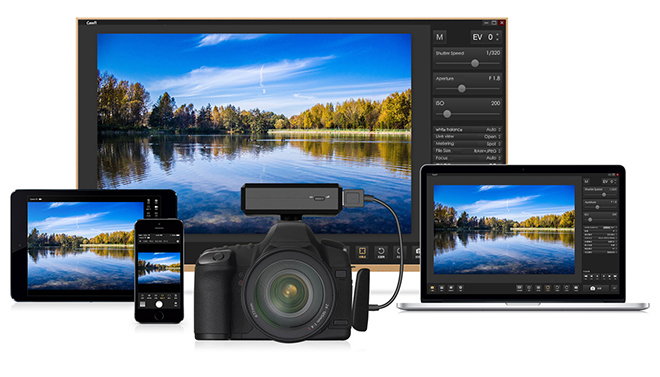
Over the last couple of years I have been investigating different options for remotely triggering cameras for wildlife photography (mostly for my project with the Arctic Fox). One of the solutions I settled on after much research was the Camptraptions camera trap system which I reviewed here (Read the REVIEW) some months ago now (and have subsequently used to photograph Arctic Fox). More recently I came across an alternate (but different) solution from a company called CamFi that utilises a smart phone for remote camera control. Now, I know that smart phone control of a DSLR is nothing new. There are a number of different products on the market that offer varying levels of camera control from smart devices. Just being totally upfront, I have historically not really been a fan of camera control from smart phones. Mostly because I find it cumbersome to use a smart phone in the sort of cold weather environments I am often shooting (plus iPhone battery life in the cold is really appalling). However, the CamFi system is so feature rich and the control is so slick that I believe the system could work reasonably well even in quite hostile conditions. Of course, much depends on your smart phone device in these sort of environments. So with the Caveat that I have not as yet had a chance to test this in either the Arctic or Antarctica you can read on…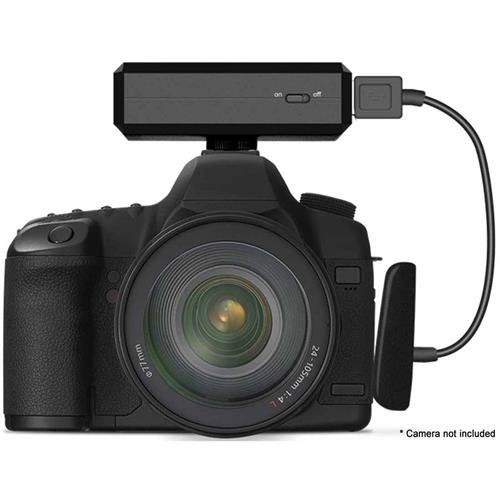 CamFi is at its most basic, a way for photographers to control their Nikon or Canon DSLR wirelessly. The list of cameras supported by CamFi is steadily growing and a complete list of currently supported cameras can be found on CamFi’s website HERE). The device mounts on the hot shoe of compatible DSLRs and creates a Wi-Fi network that you can connect to using a PC or Mac as well as Android and iOS mobile devices. The wifi network created by the CamFi trigger is by default unsecured and open (it needs to be so you can connect to it). Once you have connected to the device from your phone you can access the settings in the application and quickly and easily secure the network. Anyone using the device in dense urban areas should probably keep this in mind and secure the network as a first order of business. Wireless range is more than reasonable and will I imagine be more than sufficient for the majority of applications.
 With dedicated apps CamFi will allow for Live View on a mobile device, as well as capturing images and controlling camera settings such as AF points, metering mode, exposure compensation, aperture, shutter speed and ISO (so it can do a lot more than a pair of pocket wizards for example). You can also configure CamFi to automatically display images as they are taken and connect to an Amazon Fire Stick for viewing on TV sets (a bit gimmicky, but might be of use in a studio environment). Additionally you can browse, delete and view images, including EXIF data on your camera from your mobile device or computer, and a robust built-in time-lapse feature is included. I wont go into detail on every feature of the CamFi as that would require a lot of explanation. Suffice to say, there are some explanatory videos on the CamFi website that outline the many features of the product and these are worth investing some time in if you have an interest in remote control of your DSLR Camera.
 According to the manufacturer, CamFi has a six hour battery life. In my own initial testing I found battery life to be +/- an hour or so from manufactures specified time. I suspect battery life in cold environments to be radically reduced (although I have not as yet had time or the opportunity to test this). I suspect battery life is also going to be heavily dependant on how much you are using the device; but I have not really had time to do extensive testing to date. Given the size of the device and the requirement for it to create and communicate via a wireless network I find the battery life to be more than acceptable.
In my testing with the Canon EOS 1DX MKII and EOS 5DSR to date I have found the CamFi to be simple, responsive and intuitive to use. One might gripe that the unit that mounts on the hot shoe is bigger than it needs to be; but it would be a quibble and given the unit weighs almost nothing I don’t find the size objectionable (its not much larger than a Pocket Wizard). The unit is charged via a micro usb port and so can be plugged into any computer to charge. The CamFi is supplied with a cable appropriate to your camera at time of order and the unit itself also includes a LAN Port (LAN cable not included).
The application to control CamFi is also available for the Mac / PC. So you can control the camera from a computer as well as from a smart phone. The Camfi software is compatible with devices and computers running at least iOS 7.0, Android 4.0, Windows XP or Mac OS X 10.10. CamFi is currently listed at $130 USD on Amazon and at this price is well below manufacturer-provided options for high-end DSLRs. I find it cheap for the features and functionality it offers.
Conclusion: I have to admit that when I first received the CamFi I thought it was a bit of a gimmick and not really a serious tool for photography. However, the application offers just about every level of control you could possibly want from your camera (even live view!) and is simple and easy to operate. In real world use the software is slick, robust and quick to use. There really isn’t much to dislike about the product and I expect it will prove useful in a number of different circumstances. I can envisage a situation where I might use it to photograph Aurora Borealis at night from the comfort and warmth of my vehicle. Simply set up the camera, retreat to the warmth of the vehicle and do the rest from inside the truck!
There are a few things I would like to see in a future generation of the product. First and foremost it would be beneficial to have a battery indicator to show how much charge is remaining in the CamFi. I would also like to see the product incorporate some robust weather sealing for use in hostile environments and inclement weather. As it currently stands, the LAN port and USB ports are fully exposed, so I am not sure I would be comfortable using this device in pouring rain.
I would also very much like the ability to see a live histogram on the controlling device before I take a photograph (this feature is currently missing). You can see a full RGB histogram after you take a photograph (along with all other relevant metadata) so the lack of live histogram isn’t exactly a deal breaker; it would just be nice to have.
Summing up, CamFi is a pretty cool hardware and software system that enables remote WiFi control of many Canon and Nikon DSLR models. The CamFi iPhone App has a better interface and is more feature rich than the Canon and Nikon equivalent software. Critically, it allows you to change exposure settings as well as other key camera settings like ISO and metering. For the many DSLRs that do not have WiFi capability, it could be an important tool for remote shooting and quickly sharing photos to social media. In my own photography it will no doubt find various uses as I continue to experiment with the device.
Canon EOS 1DX MKII Firmware Update V.1.1.2
Canon has released the much rumoured firmware update for the EOS-1D X Mark II. Although I don’t often write about firmware and equipment updates I wanted to make an exception with this update as there are several new interesting features that might be appealing to some users. Of particular note is the function to set the GPS positional data retention period. I have found in my own experience that the GPS frequently looses connection when I am on ship moving in and out of my cabin; so this should resolve that issue. The addition of a function to append IPTC data is also appealing and could be useful in certain situations.
Firmware Version 1.1.2 incorporates the following improvements to enhance functions.
- The addition of a selectable color-tone option for the LCD monitor.
- The addition of a function to append IPTC data.
- The addition of a function to transfer only protected images.
- The addition of a function to set the GPS positional data retention period.
- An increase in the number of network connection settings that can be saved to a memory card from 20 to 40.
- When retrying FTP transfer, extension of the minimum auto power off time to 10 minutes.
- Improvement of wireless transmission when using Wireless File Transmitter WFT-E6.
In a nutshell: what’s new and different?
This new upgrade (version 1.1) addresses specific issues that professional news and photojournalism organizations have brought to Canon’s attention. Not all of these will be important in more ordinary, everyday use to individual photographers (including myself). That said, the changes and new features that this firmware adds to the EOS-1D X Mark II camera are the ability to:
- Install up to 39 items of IPTC information into the camera, and to add data (or deliberately not apply it) to images you take
- Add set-up information for up to 40 new Wi-Fi® networks to a memory card, and load that data as a full set of possible Wi-Fi networks to select from for connection
- Transfer only “protected” images via Wi-Fi
- Retain GPS position data: Continue to apply last known GPS location information to images subsequently taken, even if GPS connection is lost (photographer went inside a building, etc.)
- Change LCD color tone (four pre-defined settings), to either approximate display from other cameras you’re working with, or to shift color tone based on ambient lighting as the LCD monitor is being used
The aim of these changes is to enhance a professional photographer’s workflow; improve on-location network and Wi-Fi operations (especially for photographers working at large events, with many Wi-Fi networks in simultaneous operation); and to smooth the process of transferring images and managing them with new embedded metadata.
Keep in mind that the EOS-1D X Mark II differs from other Canon EOS models in that it not only permits network communication and transfer of images via Wi-Fi (using the optional WFT-E8A or WFT-E6A wireless file transmitters), but also via wired ethernet connection — there’s a dedicated ethernet port on the camera for this purpose. This allows similar network connectivity, but without some of the variables users can encounter on-location with Wi-Fi transmission.
Read more at the Canon Digital Learning Center
 www.WILDNATUREPHOTOTRAVEL.com