Australian Photographic Prize 2024 Nature Single Capture Gold Awards

Since the voluntary administration and closing of the AIPP (Australian Institute of Professional Photography), I have steered clear of the new Australian Photographic Prize Award. Like a phoenix from the ashes, the Australian Photographic Prize arose as a direct result of ex-AIPP member’s desires to maintain a high-level photographic (both print and digital) competition in Australia for both professionals and amateurs (after the Australian Professional Photography Awards that were an inseparable part of the AIPP became no more). I chose to avoid (not boycott) the Australian Photographic Prize (APP) in its first two years since I was on the board of directors that took part in the decision to shut down the AIPP via voluntary wind-up due to predicted and inevitable insolvency (based on projected cash flows). At the time, this was the fiscally responsible decision (although much has been touted otherwise), and I still believe this to be the case as a director who was privy to the full picture of the organization’s finances. As of today, there still remains a small chance the AIPP may be re-born – pending a Supreme Court decision on what is to become of the remaining surplus funds. I have a feeling we have not seen the end of the AIPP, and it may yet re-emerge in one form or another.

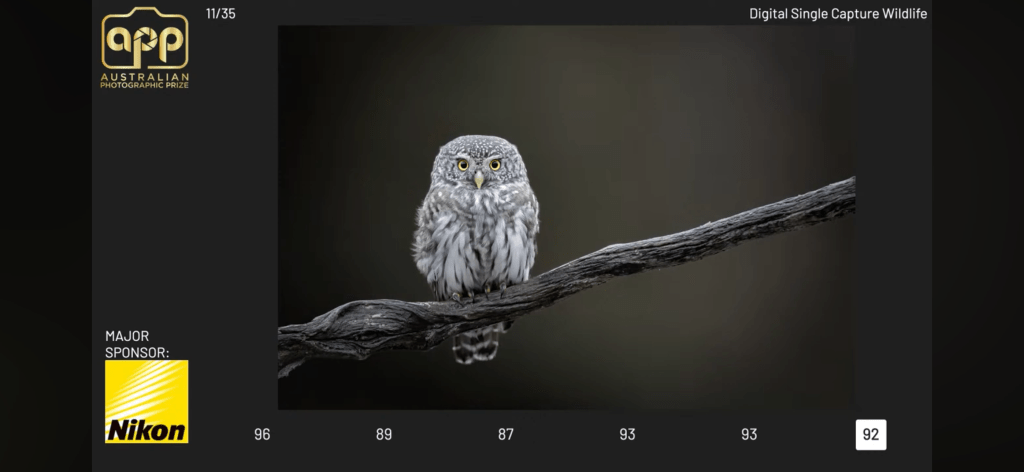
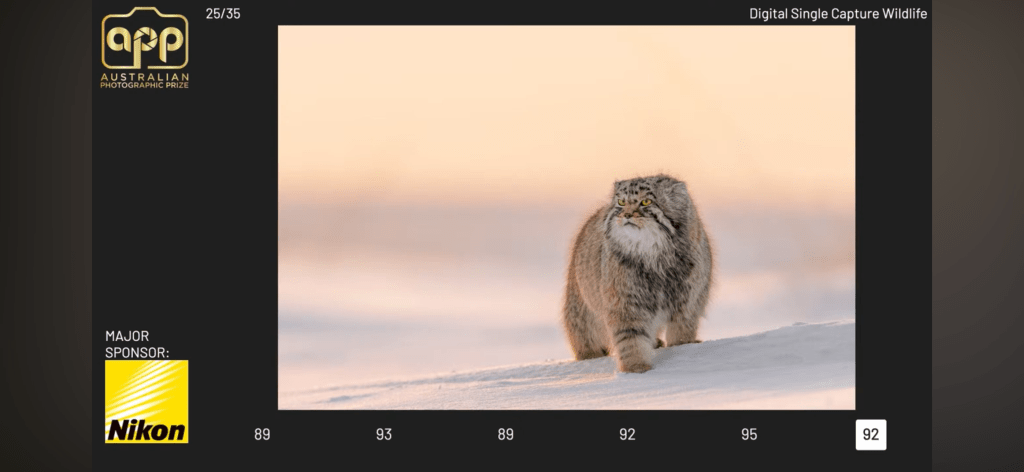
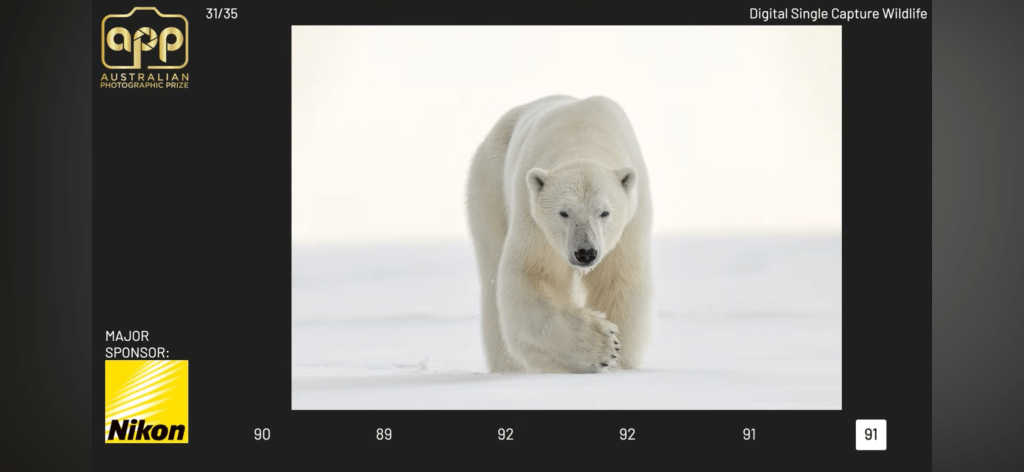
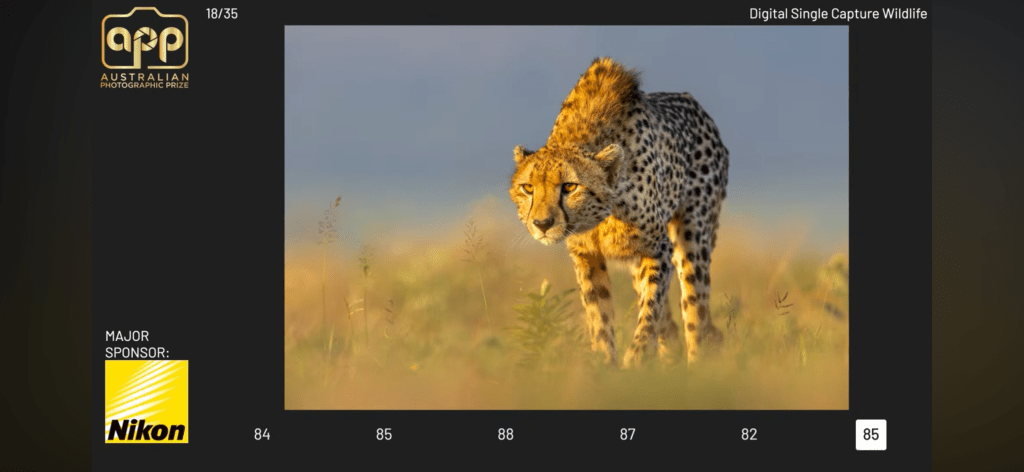
This year, I decided to put the closure of the AIPP behind me (since it felt like the dust had significantly settled) and enter the single-image Nature category of the Australian Photographic Prize. The Nature category was judged yesterday, and I just caught up on the preliminary results on You-Tube during some downtime here in Mongolia (on my summer workshop for Pallas Cats). Much like the deceased APPA awards, the APP awards are judged by a team of five professional photographers on a moderated panel. Of the five photographs I chose to enter this year, all five made the final round of judging (top 35 entered images). Three of the five have gone to receive highly coveted Gold Awards, and the remaining two racked up Silver with Distinction awards, with one photograph (of the two back-lit Cheetahs) being a single point off a fourth Gold award. Screenshots of the judge’s scores and images are included below. You can also watch the recorded live-steam for the Single Image Nature category below. The overall winner of the category will be announced in the next few days.

Addendum: Since this post, I have been notified that two of my photographs (the owl and Pallas cat) were in the final round of judging as grand finalist images.

Photograph of the Month April 2024 Arctic Snow Hare Gallop

The photograph of the month for April 2024 comes from my recent winter expedition to the east coast of Greenland (full trip report coming soon). It shows an Arctic Snow Hare in full gallop during a howling -40º C blizzard behind the small Inuit village of Ittortoqitormit on the East coast of Greenland. I photographed it with the Canon EOS R3, and the Canon RF 600mm f4L IS lens. The real challenge of this photograph (other than avoiding frostbite) was keeping the fast-moving subject in the frame as it galloped at high speed through the snow. The blizzard wind was incredibly strong, making hand-holding the lens impossible. To counter this, I lay down in the snow, using the snow cover as a makeshift tripod, cranked up the ISO to 1600 and opened up the f-stop to f6.3. This close to the subject meant the depth of field would be extremely narrow, making focus critical. Anything less than perfect focus on the eye would result in zero keepers. Incredibly, the Canon EOS R3 could track and nail focus on the eye of the fast-moving Snow Hare despite the howling wind and flying snow. Focus Case 2 was used to ignore the whirling snow around the hare. The blue background is not the sky (which could not be seen in the white-out conditions), but the wooden wall of one of the small painted houses in the village. This is an excellent example of how depth of field control can be carefully employed to control backgrounds and enhance a photograph. Without the blue background, there would be almost no contrast between the Snow Hare and the background.

Asia Pacific Photography Awards People’s Choice Winner Nature Category

The Asia Pacific Photography Awards have just announced the 2024 People’s Choice Award winner for the Nature category. I am thrilled to report my recent photograph of the Pallas Cat, titled ‘Regal Cat’, from Mongolia in winter was the overall People’s Choice award winner for 2024.

In 2022, I completely swept the pool in this category, taking First, Second, and Third place. This year, I won the Peoples Choice award in the nature category and drew with myself for third place in the judged category with the Pallas Cat photograph and the Pygmy Owl photograph. All three of my entered photographs were also top 20 and top 10 finalists.

I will return to Mongolia again in January 2025 and 2026 to photograph the Pallas Cat and the Snow Leopard. The 2025 expeditions are already sold out, but bookings are now open for 2026. You can email me for further information or to register your place. Full details are also available on my website at http://www.jholko.com/workshops.

BenQ SW272U Adobe RGB 4K Monitor Review Follow Up January 2024

Back in late 2023, I did an extensive first impressions review of the BenQ SW272U 4K Adobe RGB photographic monitor. Since then, I have been using the BenQ SW272U exclusively in my photographic studio for the post-production work of all my photography, and I wanted to do a follow-up review with my thoughts on this impressive display now that I have actually lived with and used it extensively. Specifically, I want to talk about the importance of Adobe RGB for the colour space of the display and the importance this brings to tonal gradation in photographs that include snow and ice. Or, indeed, photographs that include extensive tonal gradation of any colour. This applies to sports photographers who are shooting green fields, nature photographers like myself working with large areas of the same colour, or indeed any photographer who values the tones and tonal relationships in their photographs (and that should be all of them!).

A BRIEF HISTORY OF ADOBE RGB: First, let us talk a little bit about what Adobe RGB actually is and where it came from: The Adobe RGB (1998) colour space is a colour space developed by Adobe Inc. in 1998. It was designed to encompass most of the colours achievable on CMYK colour printers, but by using RGB Primary Colours on a device such as a computer display. The Adobe RGB (1998) colour space encompasses roughly 50% of the visible colours specified by the CIELAB colour space – significantly improving upon the gamut of the SRGB colour space (the colour space of the web), primarily in cyan-green hues. It was subsequently standardized by the IEC as IEC 61966-2-5:1999. Although Adobe RGB is an older colour space by today’s modern standards, its importance has not diminished and has actually increased in recent times with the improvements in display technology.

WHY IS ADOBE RGB IMPORTANT: Put about as simply as possible, Adobe RGB offers a bigger bucket of colour than SRGB. Perhaps the best analogy is to think of Adobe RGB as a 256-piece colour crayon set, whereas SRGB only comes with 128 colour crayons. You, therefore, get more colour depth and options with Adobe RGB. And who doesn’t want more colour options? With more green colours to choose from, more tonal gradation can be visually displayed by the display device. More tonal gradation means more life-like photographs. It also means better prints!

BUT WHAT ABOUT BIT DEPTH: Although the Adobe RGB (1998) working space provides significantly more colours than SRGB, another factor to consider when choosing between colour spaces is how each space influences the distribution of the image’s bit depth. Colour spaces with larger gamuts (such as Adobe RGB) “stretch” the bits over a broader region of colours, whereas smaller gamuts concentrate these bits within a narrow region. If you need an analogy, think of ‘bits’ as salt flakes. In an SRGB colour space, you put those salt flakes on one dinner plate. In an Adobe RGB colour space, you stretch those flakes over multiple dinner plates. Thus, the more bits you have to share across the plates in the Adobe RGB colour space, the better. You can have plenty of “spare” bits if using a 16-bit image, thus negating any reduction due to the choice of working space. That is why it’s not a good idea to use an 8-bit JPEG file as your master file. Compression aside, you don’t have sufficient bits for the larger working space.

BENQ SW272U DISPLAY PERFORMANCE: Now that we have established why we want to use Adobe RGB as our colour space and why we want to use a 16-bit Tiff file or PSD (I prefer Tiffs as they are not proprietary to Adobe) as our master file, we can move onto a discussion about the performance of the BenQ SW272U Adobe RGB 4K Photographic display. Just as an aside, don’t get confused about RAW files. Until a RAW file is demosaiced, it does not have an effective colour space. The selection of Adobe RGB or SRGB on your digital camera only applies to any JPG files you take – not RAW files. The preview you see of the RAW file on your camera is a jpeg, and its colour rendition is limited to the capabilities of the individual LCD display on your camera. That is why it is a very bad idea to make colour judgements simply by looking at the image displayed on the back of your camera. You need to get the RAW file onto your computer and view the file on a high-quality Adobe RGB-capable display. Enter the BenQ SW272U Photographic Display.

With its wide colour gamut and superb luminosity, the BenQ SW272U displays smooth, accurate colour and tonal transitions. Subtle detail and shade are rendered with exquisite care by this display. When working with images that contain snow and ice, the tonal transitions are often extremely subtle and are lost by most consumer displays (especially laptop displays and tablets). Such displays just show these areas as one shade of white or grey and are incapable of displaying the subtle nuances of the photograph. If you have never worked on a high-quality display such as an SW272U, you may not even know what you are missing. You will, however, be absolutely amazed at how much information is contained in your photographs when viewed on a high-quality, properly calibrated photographic display. Such a comparison is usually a complete revelation to the photographer. I have fielded countless comments over the years from photographers who have moved from poor-quality displays to high-quality displays who are simply dazzled by the difference they make. Put simply, a high-quality photographic display such as the SW272U should be the first thing any photographer purchases after their camera. If you are new to photography and just starting out, don’t make the mistake of thinking you can ‘get by’ with your laptop or old desktop display. Whilst these may work in displaying your photographs, they will not even come close to displaying their full glory.

Over the last weeks and months, I have been making a lot of direct comparisons between calibrated laptop displays (such as my expensive Apple Laptop XDR display) and the BenQ SW272U for displaying images with extensive snow and ice. In all instances, the BenQ shows significantly more tonal transition information than the laptop display. In many cases, the laptop display fails to show any tonal variation in the snow and ice, with images appearing just solid white or grey. Side-by-side, the BenQ SW272U shows wonderful tonal transitions in the same scenes that bring all the subtleties of the scene to bear. The net result is an image that is far more life-like and that beautifully displays the soft tones in the image. If you want to see and experience the full detail of your RAW files then you absolutely need and will want a display such as the SW272U. Of course, such advantages are not limited to images with ice and snow but apply to all colour (and B&W!) photographs.

Perhaps best of all, and as I discussed in my initial review of the SW272U, the new PMU or Pallete Master Ultimate software is the easiest and most intuitive software I have yet come across for calibrating displays. BenQ is to be commended for taking what was traditionally overly complex and confusing software that was full of technical terms that baffled most users and for making it into a streamlined, simple process with a clean and easy-to-understand user interface. It may seem trivial, but the user experience during calibration plays a large role in end-user happiness and BenQ have nailed this aspect. Bravo BenQ!

CONCLUSION: The BenQ SW272U gets my highest recommendation for bang vs. buck for performance. You can spend thousands of dollars more on alternative brands that offer performance no better (and in some cases, not even as good as the SW272U. It also gets top marks for its overall performance, regardless of price. In fact, taking price completely out of the equation, I believe the BenQ SW272U to be the current best choice in the market for photographers looking for the highest levels of performance. With its wide Adobe RGB gamut, superb luminosity, and ability to render subtle tonalities with starting depth and clarity, it makes for an open-and-shut case for any photographer looking to get the best from their photographs. And that’s all of them – right?